Feature

Invoicing & Payments

Single and batch invoices, card payments into the club's own Stripe account, bank transfer and cheque, with reminders and a yearly overview.

What it does

One screen runs your club's entire billing operation. The admin Invoices page leads with a live Yearly Financial Overview — four KPI cards (Total Revenue, Collected with a live collection-rate %, Outstanding, Overdue) and a Monthly Breakdown chart — above the full invoice list with status, member, and category filters. Every invoice carries multiple line items with VAT, status (Paid / Sent / Overdue / Cancelled), and one-click actions: Record Payment, Send Reminder, Download PDF, Cancel.

Members get a My Invoices page in the members area with totals at the top and All / Unpaid / Paid tabs. Tap any invoice to see line items and pay by card via Stripe Checkout (card, Klarna, Link), choose an installment plan, or notify the treasurer of a bank transfer. The same PDF download is available to admins and members.

What sells it

  • Live financial overview — Total Revenue, Collected (with collection-rate %), Outstanding, Overdue, plus a monthly chart
  • Batch invoicing — issue the annual subscription to every member of a given type in one operation, each invoice numbered separately
  • Installment plans — split any invoice into 3, 5, 12 (or custom) dated installments with their own paid / pending status
  • Partial payments natively — pay £200 against a £600 invoice and the £400 outstanding stays tracked; no separate "deposit invoice" workflow
  • Stripe checkout for card, Klarna, and one-click Link payments; autopay for members who want automatic collection on the due date
  • Bank transfer self-serve — members get account details and an "I've paid — notify admin" button that surfaces the invoice for treasurer confirmation
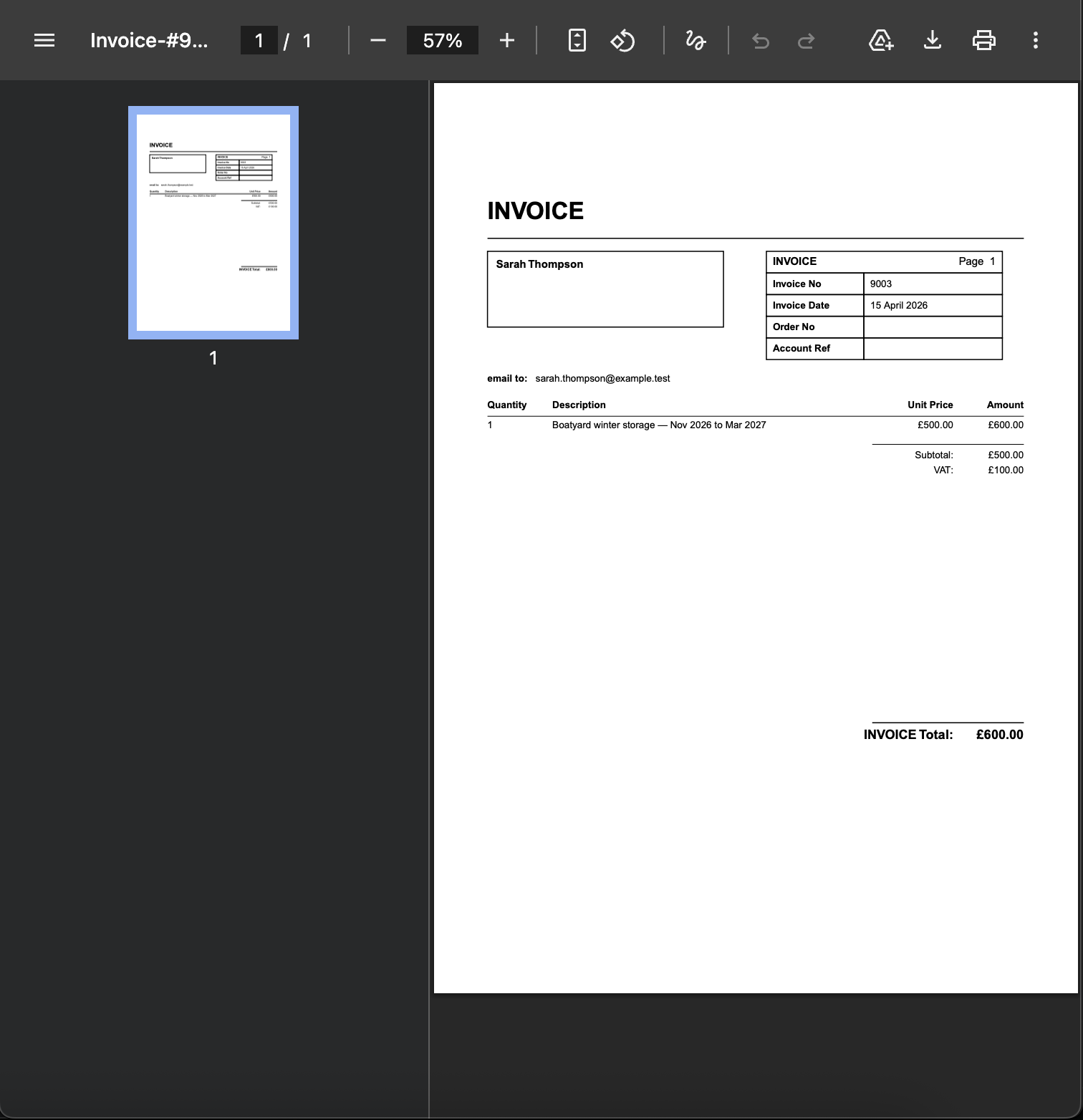
  • Branded PDF download — formatted invoice with header, line items, subtotal, VAT, and total — admin and member sides both
  • VAT-aware line items, configurable invoice categories (Membership, Mooring, Boatyard, Bar, anything), and bill-payer assignment for family memberships

Why this matters

Chasing subscriptions by post and reconciling bank transfers against a spreadsheet costs clubs hours every month and breeds disputes when records don't match. One place for the financial overview, the invoice list, the member portal, and Stripe checkout gives treasurer and member the same source of truth — payment either went through or it didn't, both sides see the same record. Partial payments and installment plans fit how clubs actually charge: deposits on storage, monthly splits on annual subs, occasional bar tabs.

Frequently asked questions

Online by card (Visa, Mastercard, Amex, Discover), Klarna, or one-click Stripe Link. Bank transfer with an "I've paid — notify admin" button to flag the treasurer. Cash and cheque are recorded manually by the admin. Each invoice toggles which methods are accepted.

See related features: Member Management · Online Shop · back to Club Management Software.
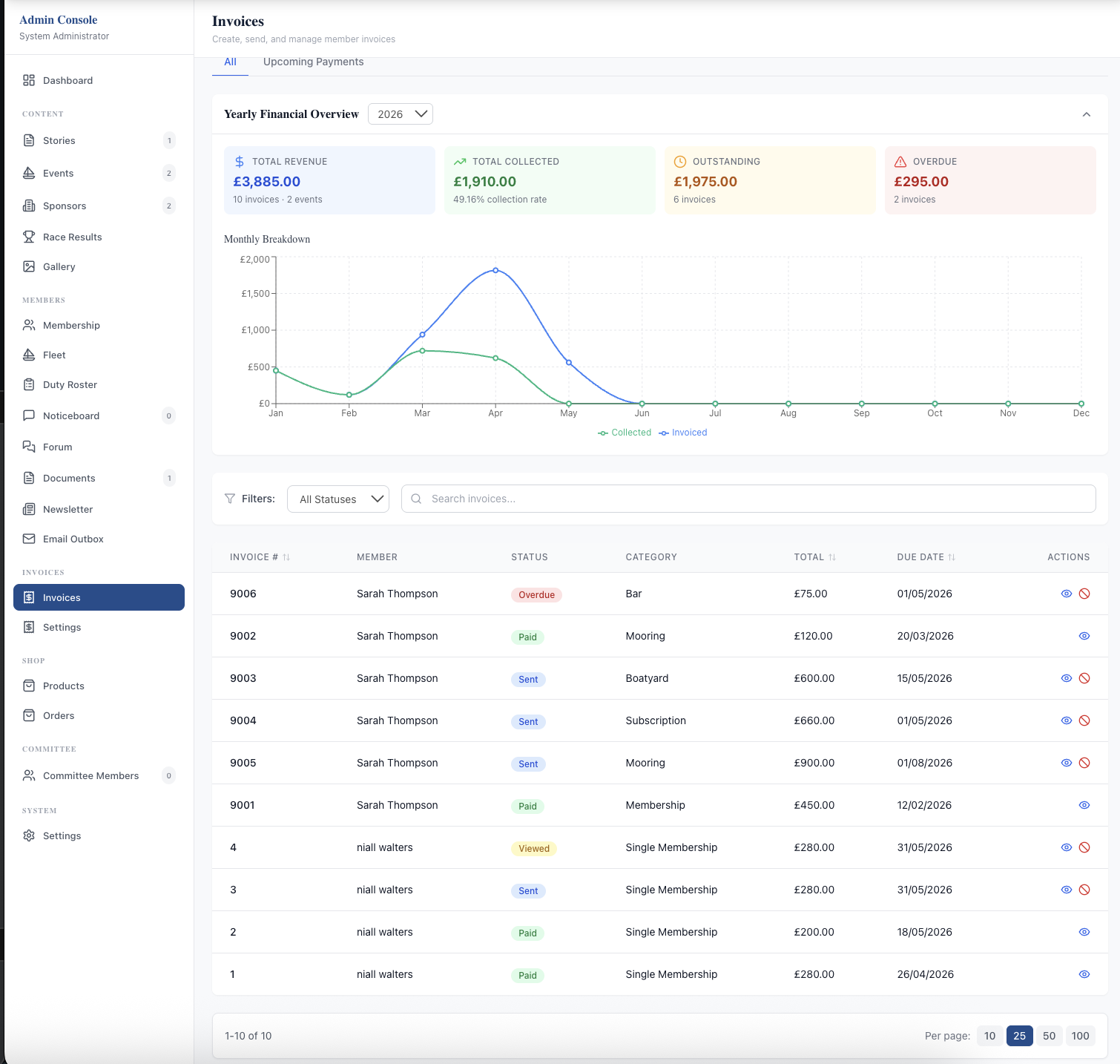
The admin Invoices page: a Yearly Financial Overview header with four KPI cards (Total Revenue £1,895.00, Collected £1,910.00 with 90.5% collection rate, Outstanding £1,975.00, Overdue £295.00), a Monthly Breakdown line chart showing revenue vs collected, then filters (All Statuses, search by member, category) and a table listing 10 invoices with #, member, status badge, category, total, due date, and actions.
Admin: yearly financial overview at the top — four KPIs (revenue, collected, outstanding, overdue) and a monthly revenue-vs-collected chart — then the full filterable invoice list.
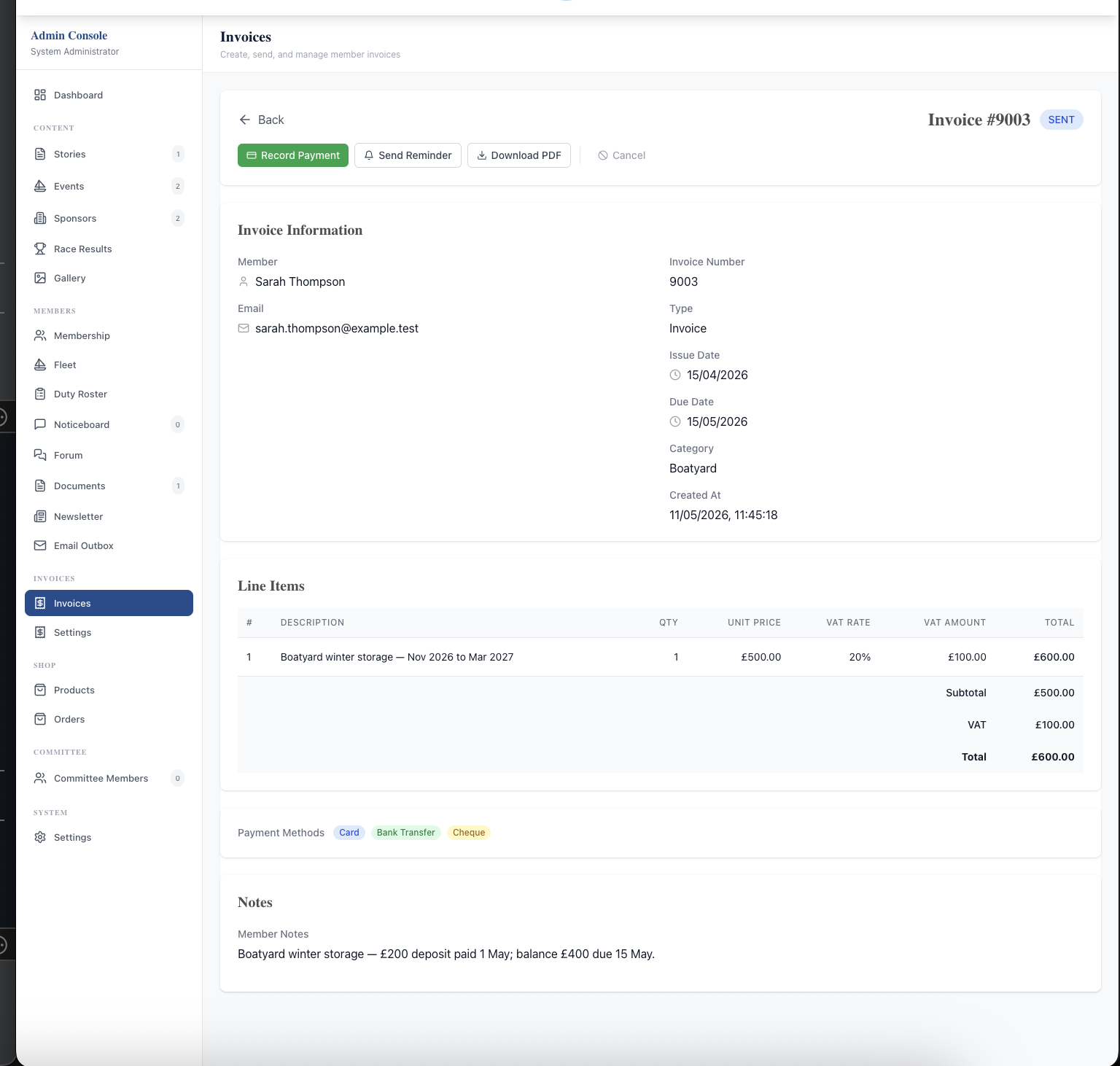
The admin Invoice Detail page for #9003: a SENT status badge, four action buttons (Record Payment, Send Reminder, Download PDF, Cancel), Invoice Information panel with member, email, type, dates, and category, a Line Items table with description, quantity, unit price, VAT rate (20%), VAT amount, and total (£600.00), per-invoice Payment Methods pills (Card, Bank Transfer, Cheque), and a Notes section with member-facing text.
Admin: full invoice detail with structured line items, VAT, per-invoice payment-method pills, and four one-click admin actions (Record Payment, Send Reminder, Download PDF, Cancel).
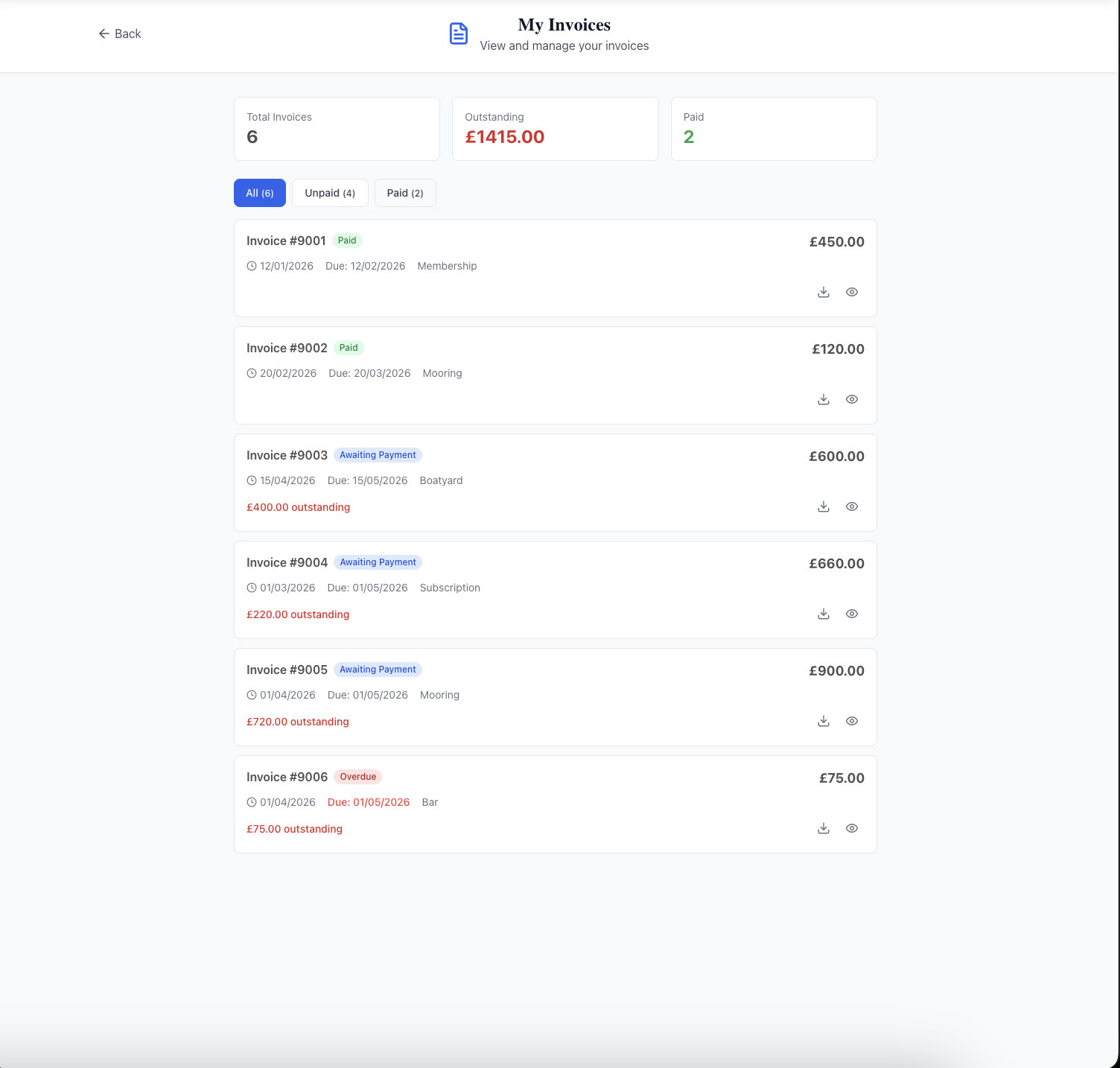
A member's My Invoices page: header with three summary cards (Total Invoices 6, Outstanding £1,415.00 in red, Paid 2 in green); filter tabs All (6), Unpaid (4), Paid (2); and a list of six invoices each showing invoice number, status badge (Paid, Awaiting Payment, or Overdue), total, dates, category, and outstanding amount where applicable.
Member: My Invoices portal with summary cards, All/Unpaid/Paid filter tabs, and per-invoice status, totals, and outstanding amounts at a glance.
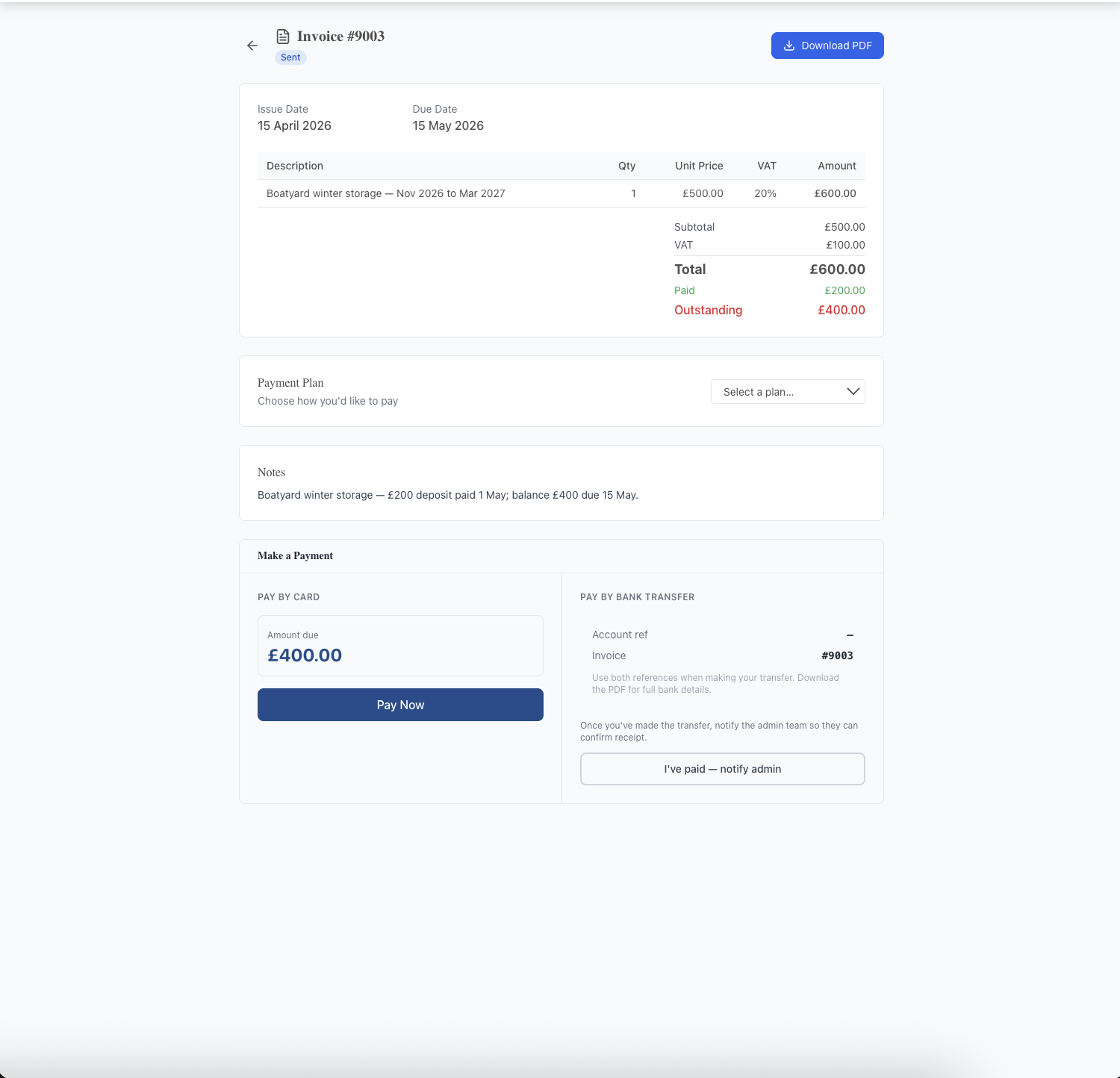
A member's invoice payment page for #9003: line items table, subtotal/VAT breakdown, a Total / Paid (green) / Outstanding (red) breakdown showing £600 / £200 / £400, a Payment Plan dropdown ("Choose how you'd like to pay"), Notes section, and a Make a Payment panel split into two columns — Pay by Card (with amount due £400 and a Pay Now button) and Pay by Bank Transfer (with account ref, invoice reference, and an "I've paid — notify admin" button).
Member: invoice payment page. Pick a Payment Plan, then pay by card via Stripe or notify admin of a bank transfer — partial payments leave the balance clearly displayed.
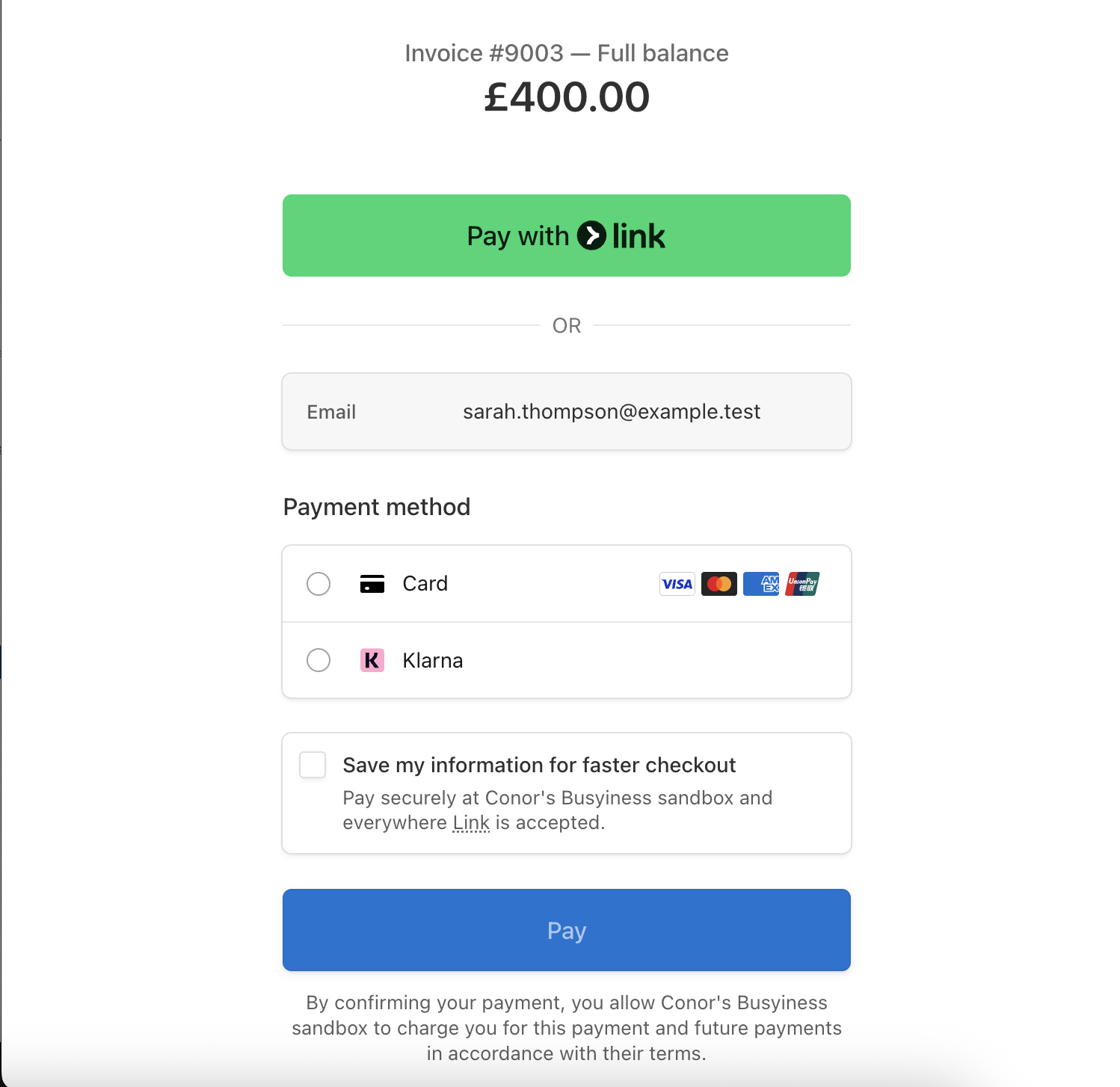
The Stripe Checkout page launched from the Pay Now button: "Invoice #9003 — Full balance £400.00" heading, a green Pay with Link button at the top, an OR divider, the member's email pre-filled, a Payment method panel with Card (Visa, Mastercard, Amex, Discover icons) and Klarna radio buttons, a "Save my information for faster checkout" option, and a Pay button.
Stripe Checkout — one-click Pay with Link, or card / Klarna with Stripe's standard PCI-compliant flow. Card details never touch your servers.
The downloaded PDF of invoice #9003 opened in a browser viewer: an INVOICE header, the member name in a bordered box, an invoice info table on the right (Invoice No 9003, Invoice Date 15 April 2026, Order No, Account Ref), an email-to line, a line-items table (Quantity 1, Description "Boatyard winter storage — Nov 2026 to Mar 2027", Unit Price £500.00, Amount £600.00), Subtotal £500.00, VAT £100.00, and INVOICE Total £600.00.
PDF download — branded, formatted invoice ready to attach to an email, file for records, or send to an accountant. Members can download their own from the My Invoices portal.

Related features

See Invoicing & Payments in action — book a 20-minute walkthrough.