Feature

Online Shop

Burgees, polos and stickers with sizes and colours, guest checkout by card and collection from the club.

What it does

A branded online shop built into your public club website. Members, visitors, and visiting crews browse merchandise, pick variants, and check out by card — no account required. It replaces the "order by email, pay at the bar" workflow with self-serve checkout that collects payment up front and hands whoever's fulfilling at the clubhouse a clean order queue.

The buyer side is a slide-out cart with a short Your Details form (name, email, optional phone), a "Collection from club only" notice, and a Proceed to Payment button that launches Stripe Checkout — Pay with Link, Card, or Klarna. Orders settle into the same Stripe Connect business account used for invoicing and event registration. Buyers receive an email when the item is ready to collect; admins manage products and the order queue under Shop in the admin panel.

What sells it

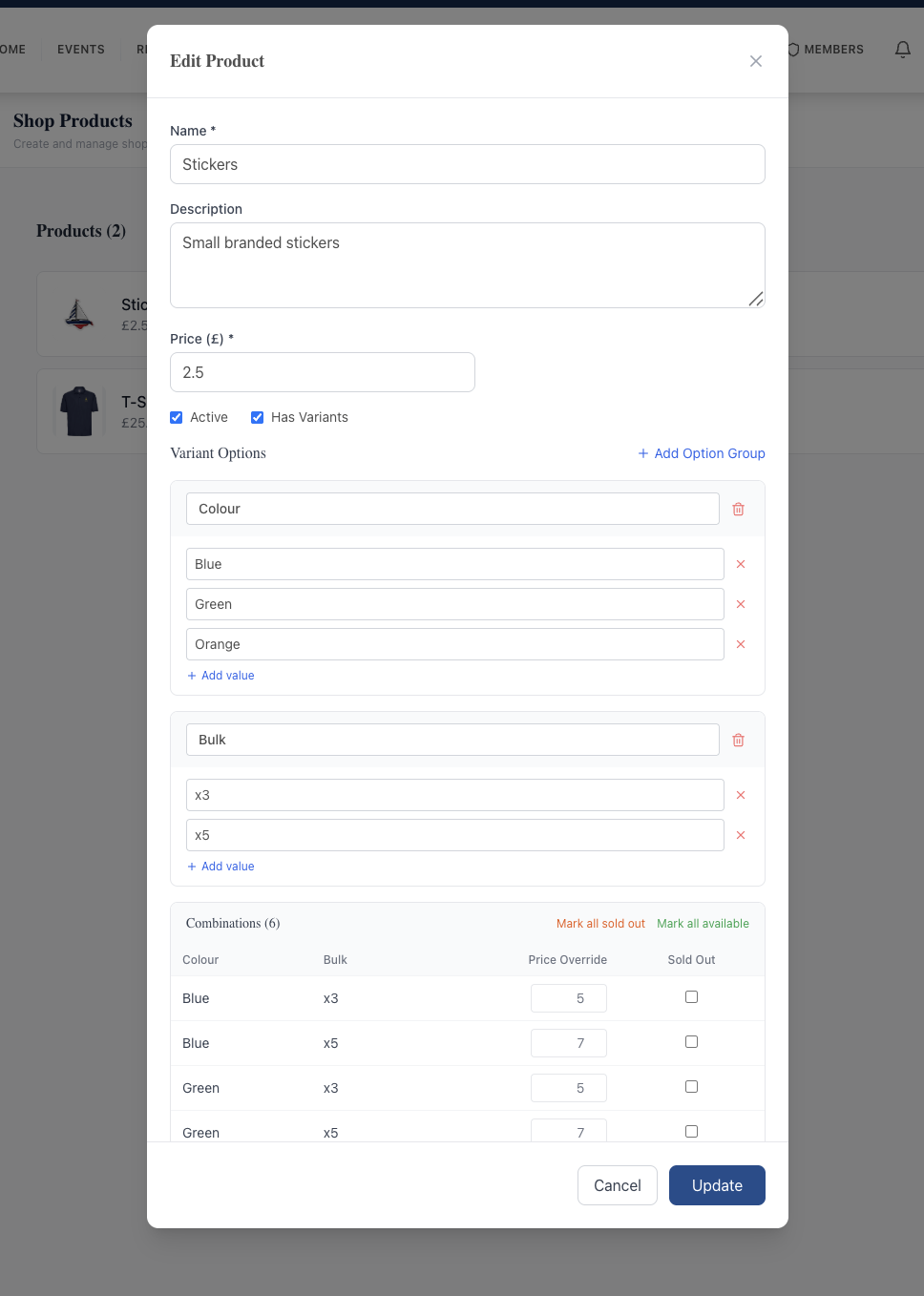
  • Multi-dimensional variants — Colour and Size and Bulk on the same product, with an auto-generated Combinations table covering every permutation
  • Per-combination Price Override — a Bulk x5 pack can cost £7 while x3 costs £5, independent of the base price
  • Per-combination Sold Out flag — mark Blue/XL out of stock without affecting any other size or colour; Mark all sold out / Mark all available bulk actions for end-of-season
  • No buyer account required — checkout takes only name, email, and optional phone in the cart slide-out, ideal for visiting crews
  • Stripe Checkout with Pay with Link, Card, and Klarna; PCI flow handled by Stripe so card data never touches your servers
  • Click-and-collect by default with an email-when-ready notification — built around the clubhouse pickup that most clubs actually run
  • Shared Stripe Connect account with invoicing, autopay, and events — one bank account, one reconciliation
  • Not just merch — visitor mooring top-ups, fuel-dock tokens, charity raffle tickets, and social-event tickets all flow through the same checkout

Why this matters

Selling merchandise by paper sign-up sheet or "DM the secretary" wastes the half of the year between AGMs when members would happily buy a polo or a fleece. A self-serve public shop turns burgees, stickers, social-event tickets, and visitor mooring top-ups into card transactions that settle straight to the club account — and visiting crews who arrive without a member login can buy and collect on the day.

Frequently asked questions

Yes. Each product can have multiple variant option groups (e.g. Colour, Size, and Bulk), each with any number of values. The system auto-generates the Combinations table — every Colour × Size × Bulk permutation — and each row can be price-overridden and sold-out-flagged individually.

See related features: Invoicing & Payments · Member Management · back to Yacht Club Software.
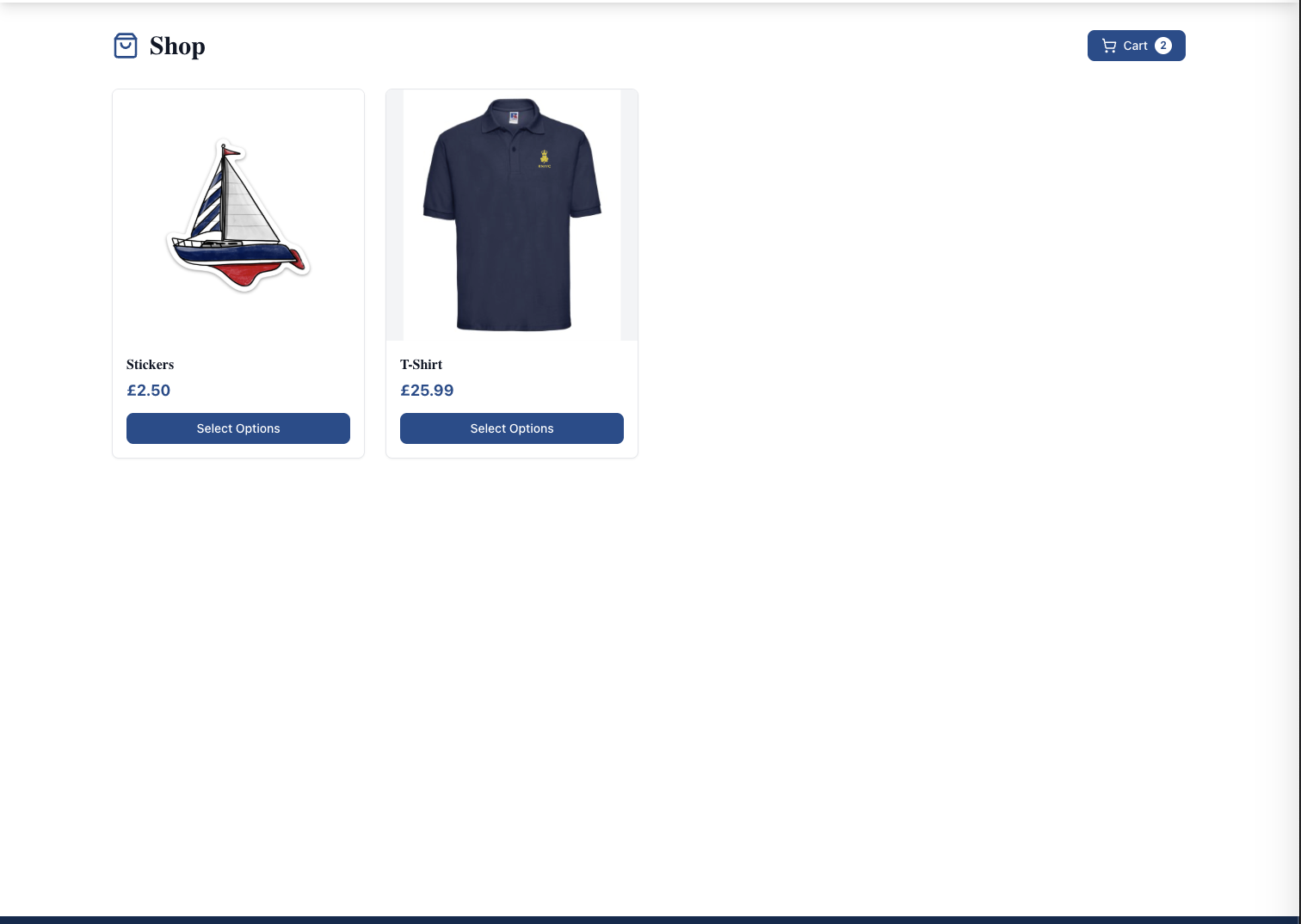
The public Shop page: a clean header with the Shop title and a Cart (2) badge in the top right, then a grid of two product cards — Stickers at £2.50 and a T-Shirt at £25.99 — each showing a large product image, name, price, and a Select Options button.
Public shop page — products as cards with image, name, price, and a Select Options button. Cart icon top-right opens the slide-out panel.
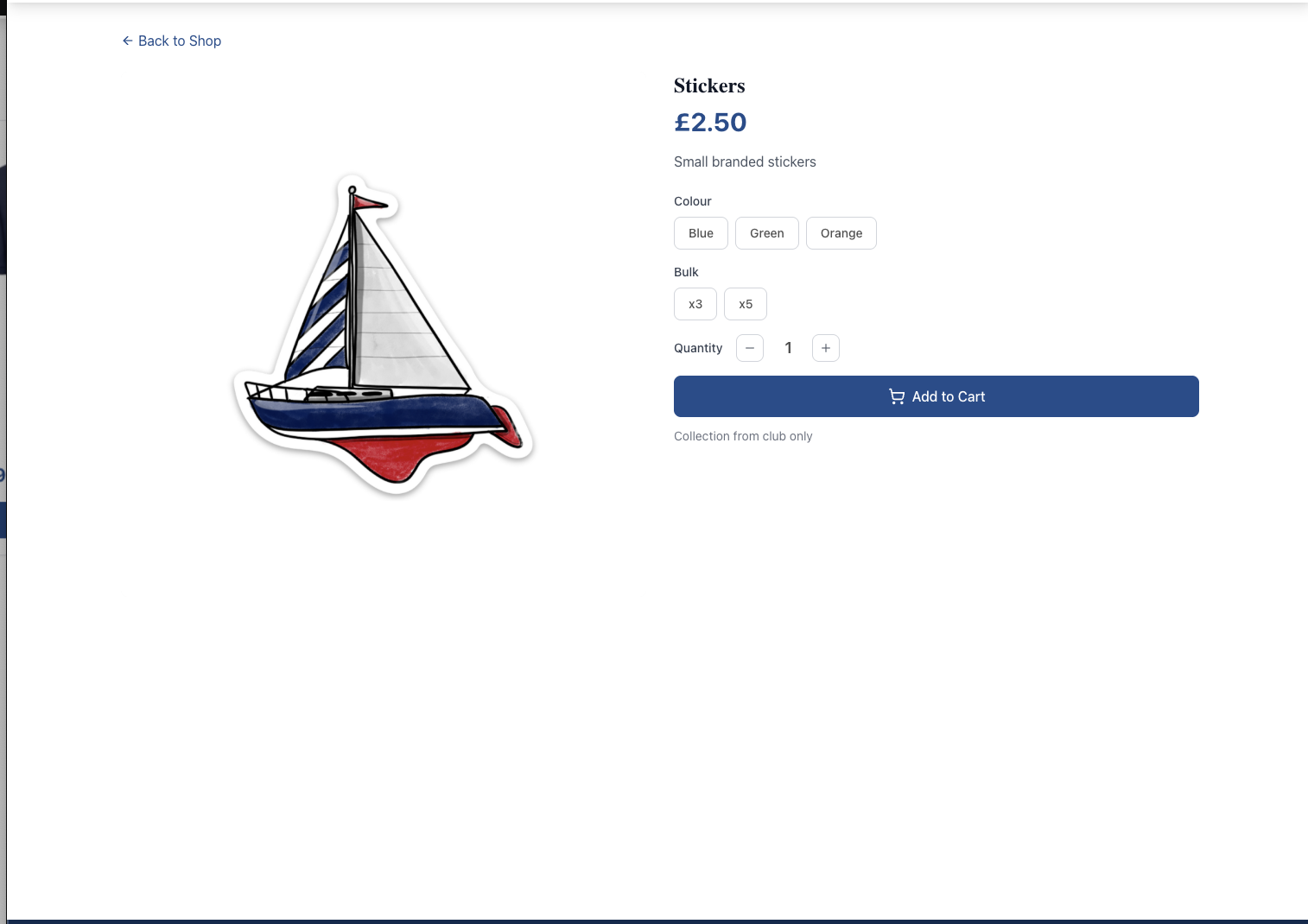
A product detail page for "Stickers": Back to Shop link, large product image of a branded sailboat sticker, name + £2.50 price, a "Small branded stickers" description, two variant option groups rendered as pill buttons — Colour (Blue, Green, Orange) and Bulk (x3, x5) — a quantity stepper, an Add to Cart button, and a "Collection from club only" notice underneath.
Product detail page — variant options render as pill buttons; price updates live based on the selected combination. "Collection from club only" sets the buyer expectation.
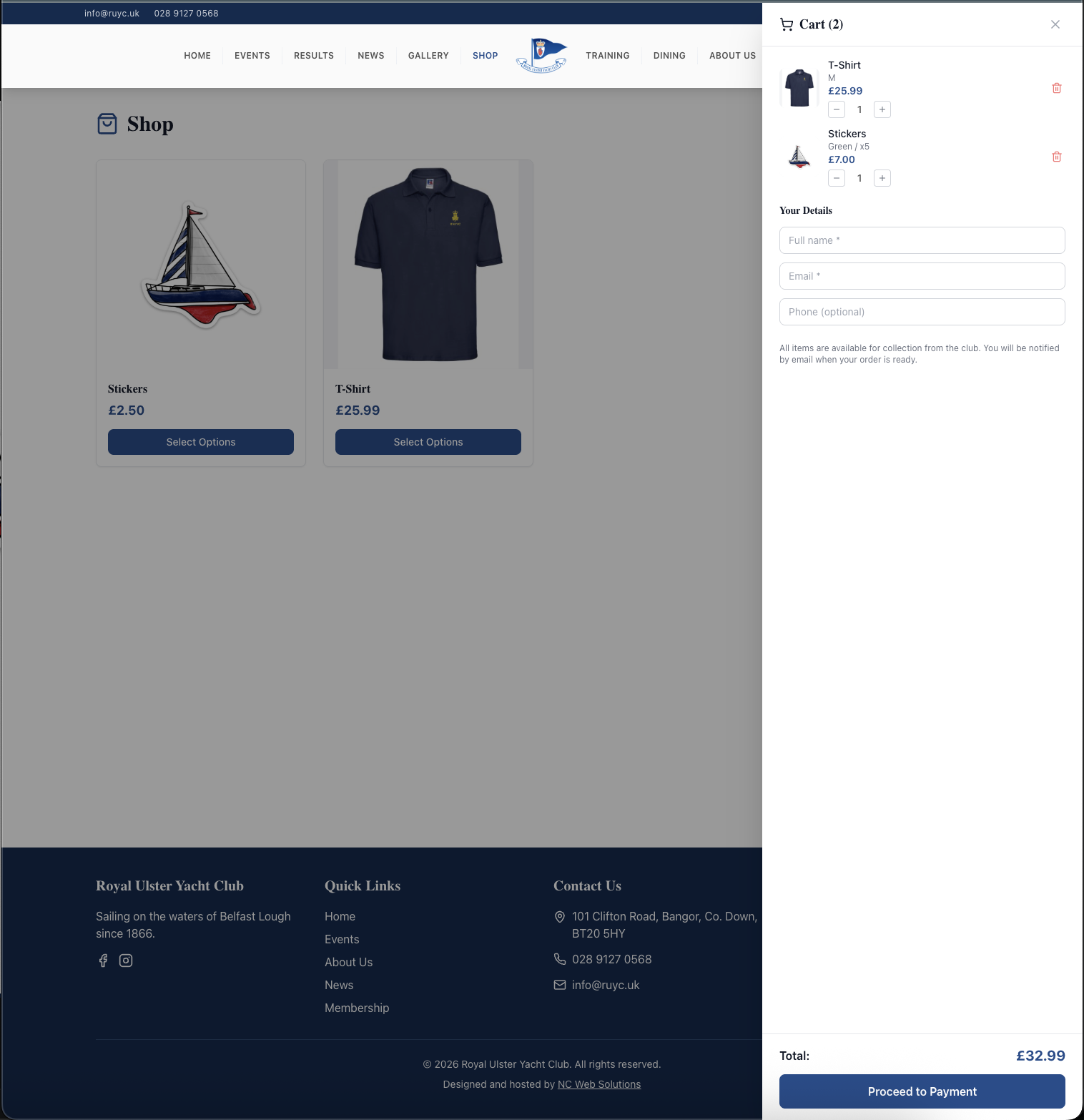
The cart slide-out panel: two items listed (T-Shirt size M £25.99, and Stickers Green x5 £7.00) each with quantity steppers; below them a Your Details form with Full name, Email, and optional Phone fields; a notice "All items are available for collection from the club. You will be notified by email when your order is ready"; a running Total of £32.99; and a Proceed to Payment button. The full club website navigation is visible above (HOME, EVENTS, RESULTS, NEWS, GALLERY, SHOP, TRAINING, DINING, ABOUT US, MEMBERS).
Slide-out cart panel — items, quantity steppers, the Your Details form, the click-and-collect notice, total, and Proceed to Payment all in one panel.
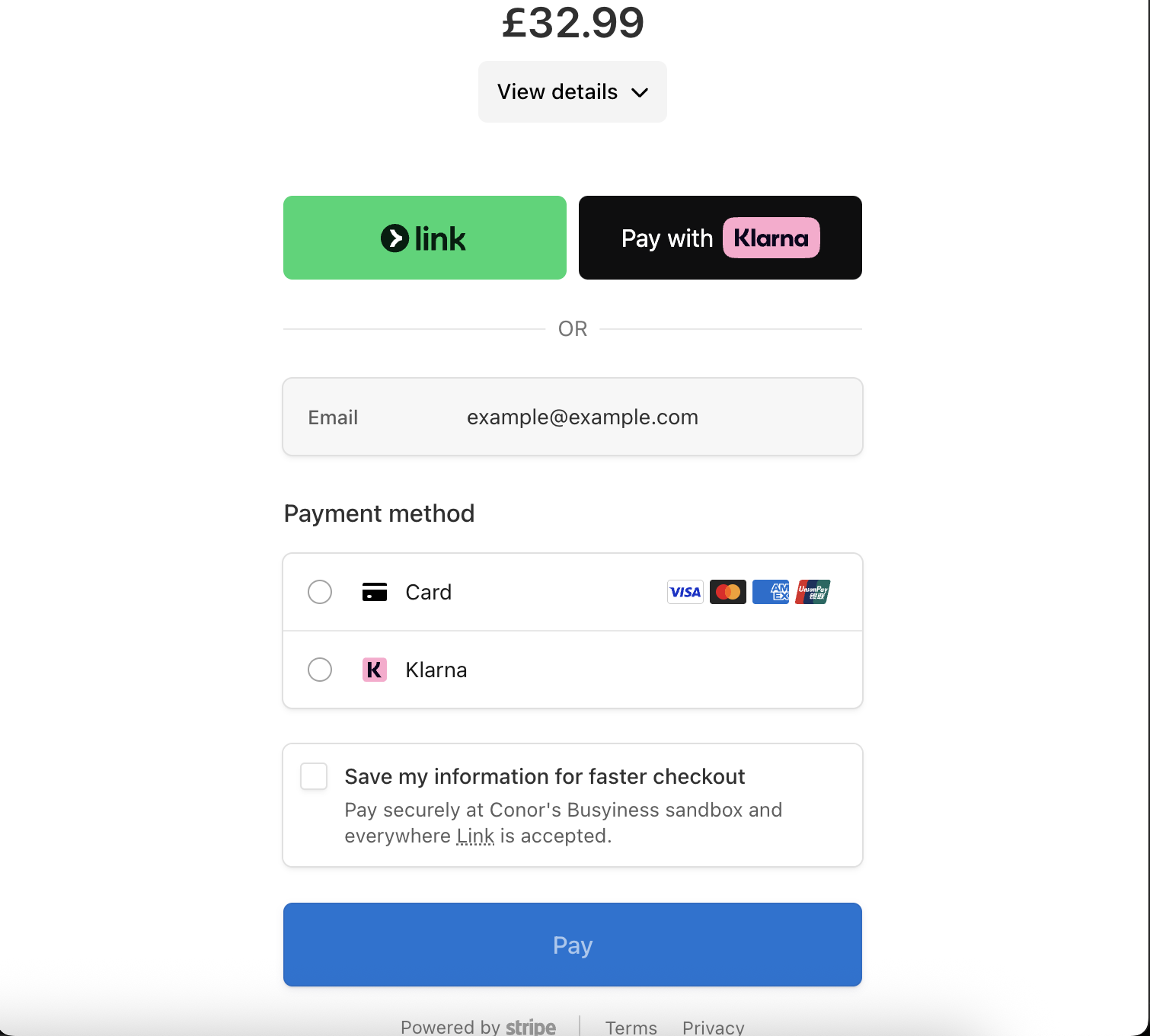
Stripe Checkout for the cart total £32.99: a green Pay with Link button and a black Pay with Klarna button side by side at the top, an OR divider, an email field, a Payment method panel with Card (Visa, Mastercard, Amex, Discover icons) and Klarna radio buttons, a "Save my information for faster checkout" option, a Pay button, and a Powered by Stripe footer with Terms and Privacy links.
Stripe Checkout — Pay with Link (one-click), Card, or Klarna. No buyer account on the club site; card data never touches your servers.
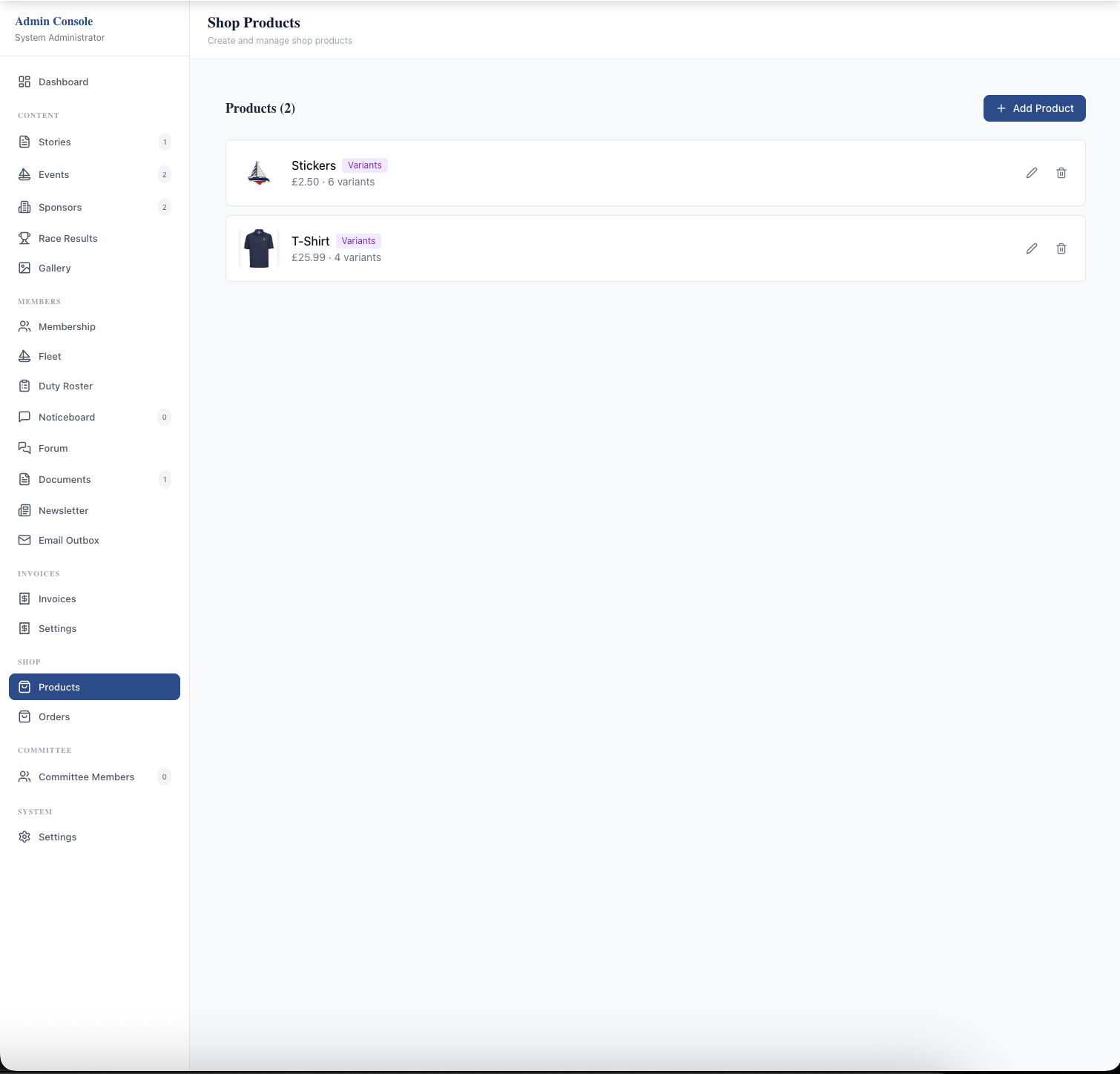
The admin Shop Products page: title "Shop Products — Create and manage shop products", a Products (2) header with an "+ Add Product" button on the right, and a list of two products. Each row shows a thumbnail image, the product name, a "Variants" badge, the base price and variant count ("£2.50 · 6 variants", "£25.99 · 4 variants"), and Edit (pencil) and Delete (trash) icons. Left sidebar shows the SHOP section with Products (active) and Orders sub-pages.
Admin Products page — every product with its image, name, Variants badge, base price, variant count, and inline Edit/Delete. The Orders sub-page sits alongside.
The Edit Product modal for the Stickers product: Name field, Description textarea, Price field (£2.50), Active and Has Variants checkboxes, then a Variant Options section with two option groups — Colour (Blue, Green, Orange) and Bulk (x3, x5) — each with an Add value link and a delete icon per value. At the bottom a Combinations (6) table lists every Colour × Bulk combination (Blue/x3 £5, Blue/x5 £7, Green/x3 £5, Green/x5 £7, etc.) with a Price Override field and a Sold Out checkbox per row, plus "Mark all sold out" and "Mark all available" bulk actions.
Edit Product modal — define multiple variant option groups, and the platform auto-generates the Combinations table. Each combination gets its own price override and sold-out flag.

Related features

See Online Shop in action — book a 20-minute walkthrough.