Feature

Duty Roster

Plan the season's duties. Members get reminders, see their duties and arrange swaps with each other.

What it does

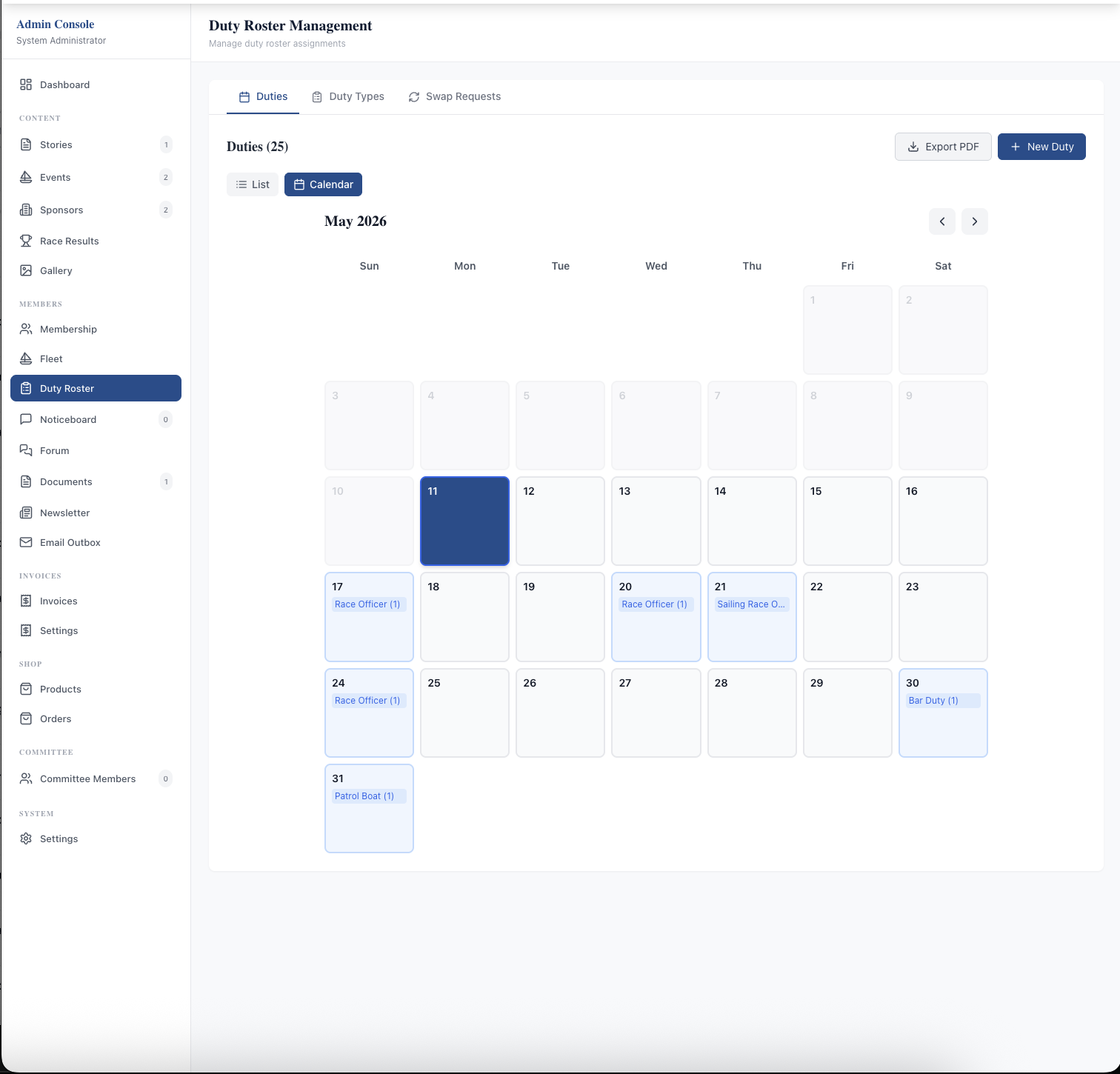
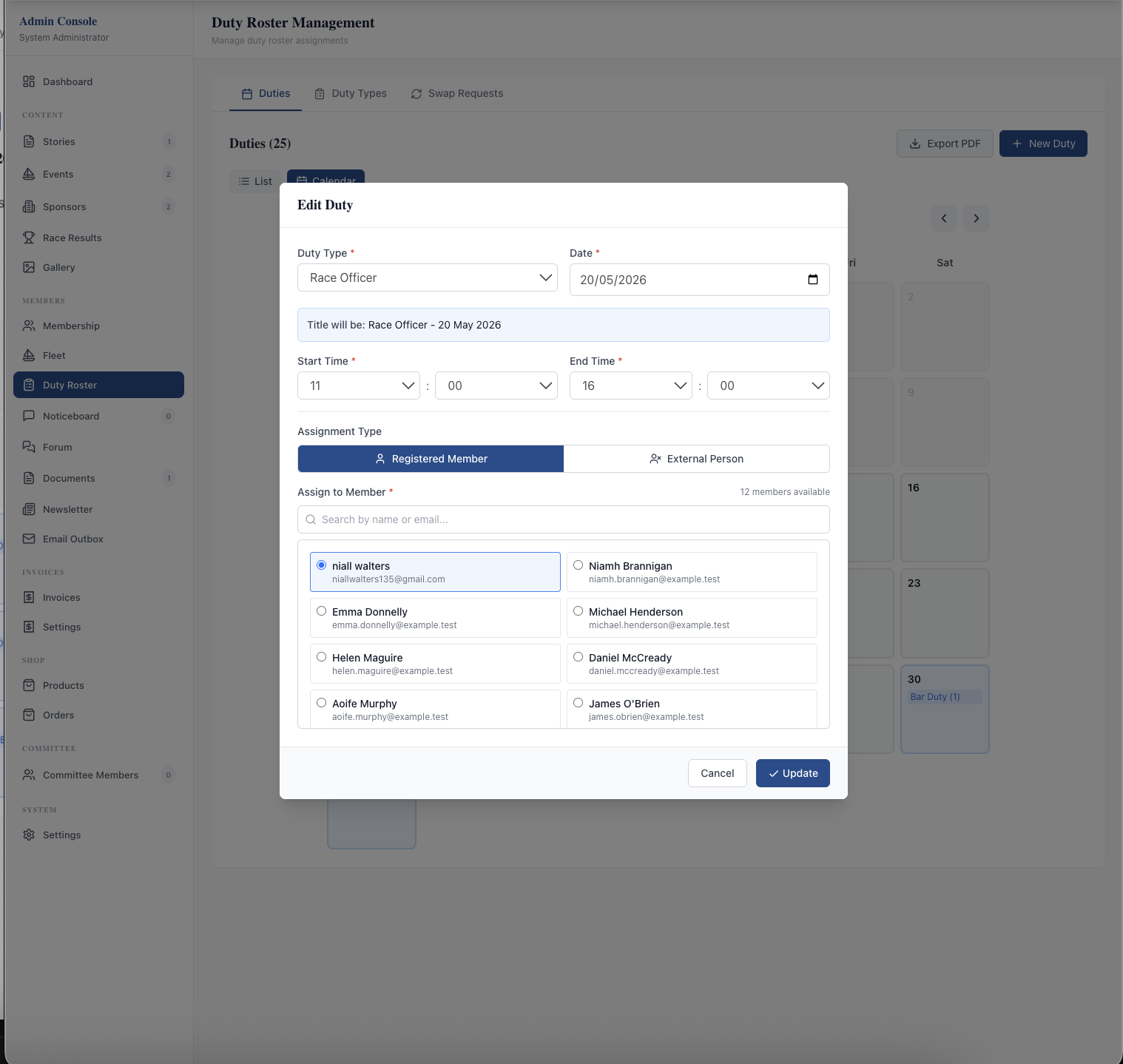
Duty Roster is the member-managed rostering system that ends the co-ordinator's weekly admin chore. The admin side has three tabs — Duties, Duty Types, and Swap Requests — with the Duties tab toggling between a searchable List view and a month-grid Calendar view that shows duty counts per date as coloured pills. Create a duty with auto-filled title (duty type + date), pick the assignee from a search-by-name-or-email list, or use the External Person toggle to assign a guest race officer or paid contractor. Export PDF generates a printable roster for the clubhouse noticeboard.

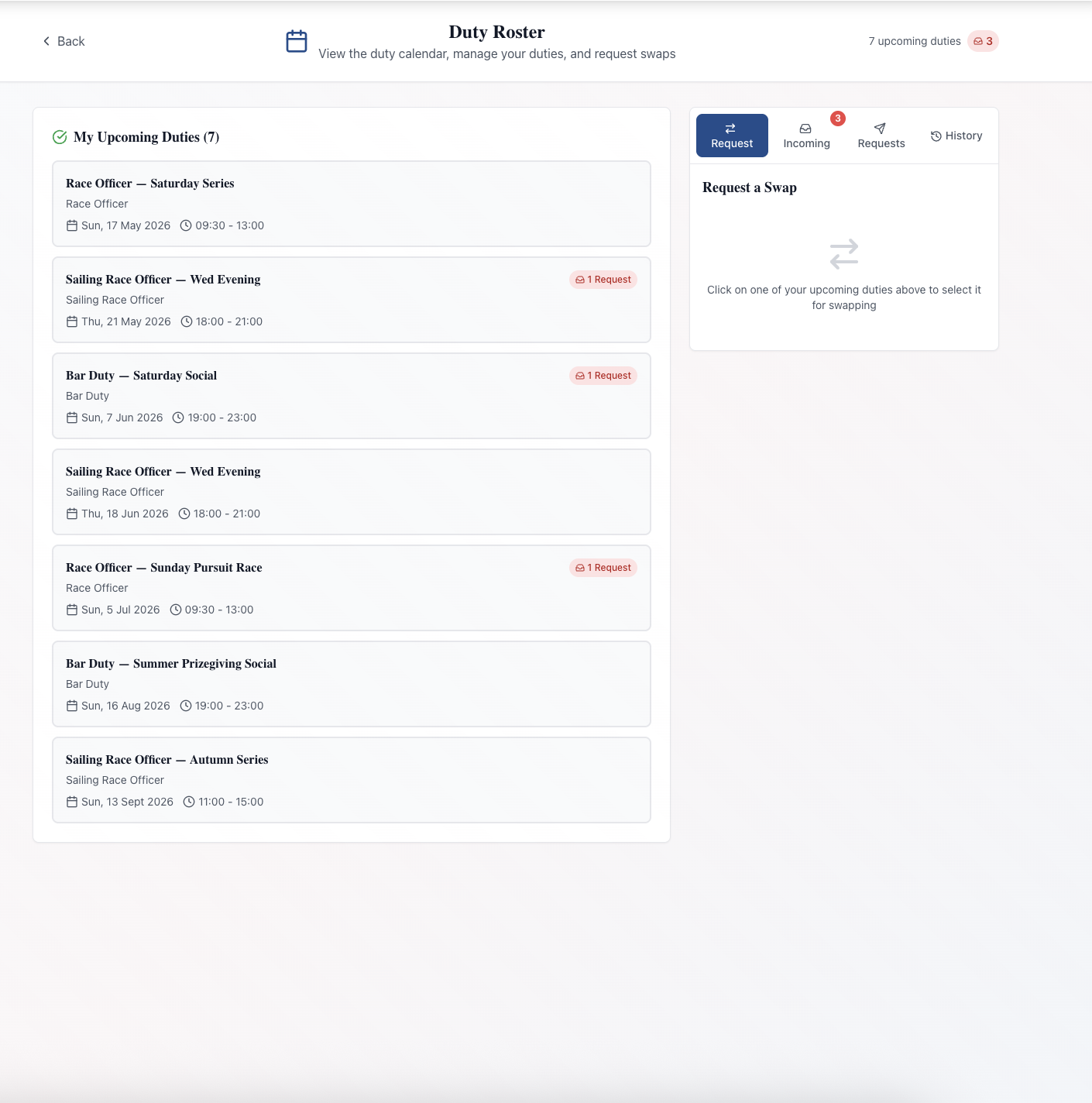
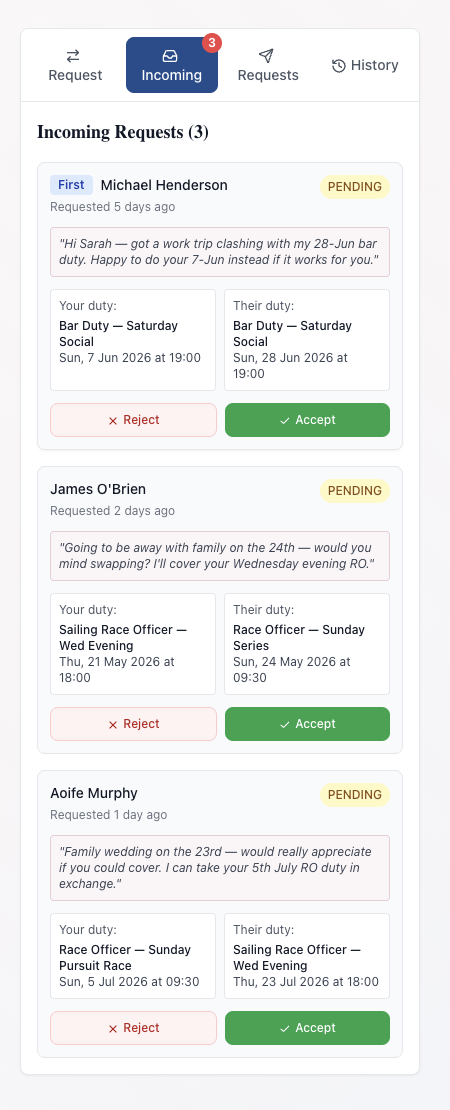
Members run their own swaps. The Duty Roster page leads with "My Upcoming Duties" — every duty assigned to that member, with a count badge for any incoming swap requests pending against each — alongside a four-tab workflow: Request (pick a target duty from a calendar, nominate a swap partner, add a note), Incoming (other members' requests with requester name, "requested X days ago", note, both duties side by side, one-click Reject/Accept), Requests (your own swaps with live status), and History.

What sells it

  • Member-managed swaps — once duties are set up, members raise and accept swaps themselves; the co-ordinator's job shrinks from weekly chore to occasional override
  • List and Calendar admin views — search-by-member-name in List view, month-grid pill counts in Calendar view, toggle on the same tab
  • One-click Accept / Reject on incoming swap cards showing requester, timestamp, personal note, and both duties side by side
  • Notification badges — Incoming tab and each affected duty in My Upcoming Duties show pending-request counts so members spot what needs attention
  • External Person assignments — assign a duty to a named non-member (freelance race officer, paid contractor, guest official) on the same roster
  • Custom Duty Types — Race Officer, Sailing Race Officer, Bar Duty, Patrol Boat, Safety Boat, or anything your club rosters
  • Admin Swap Requests queue — co-ordinator can monitor and override assignments without becoming a relay for every change
  • Export PDF — printable formatted roster for the clubhouse noticeboard, email, or WhatsApp

Why this matters

The biggest pain in running a duty roster is the co-ordinator becoming a relay station — every swap request lands by text, email, or WhatsApp and somebody has to update a shared spreadsheet that nobody is sure is current. A member-managed system flips that: admins set up the season once, members run their own swaps, and the system itself is the source of truth.

Frequently asked questions

No — that's the point. Once duties are set up at the start of the season, members raise swap requests themselves and the receiving member accepts or declines inside their Incoming tab. Admins only step in for edge cases, like reassigning a duty when a member leaves the club mid-season.

See related features: Member Noticeboard · Communications · back to Sailing Club Software.
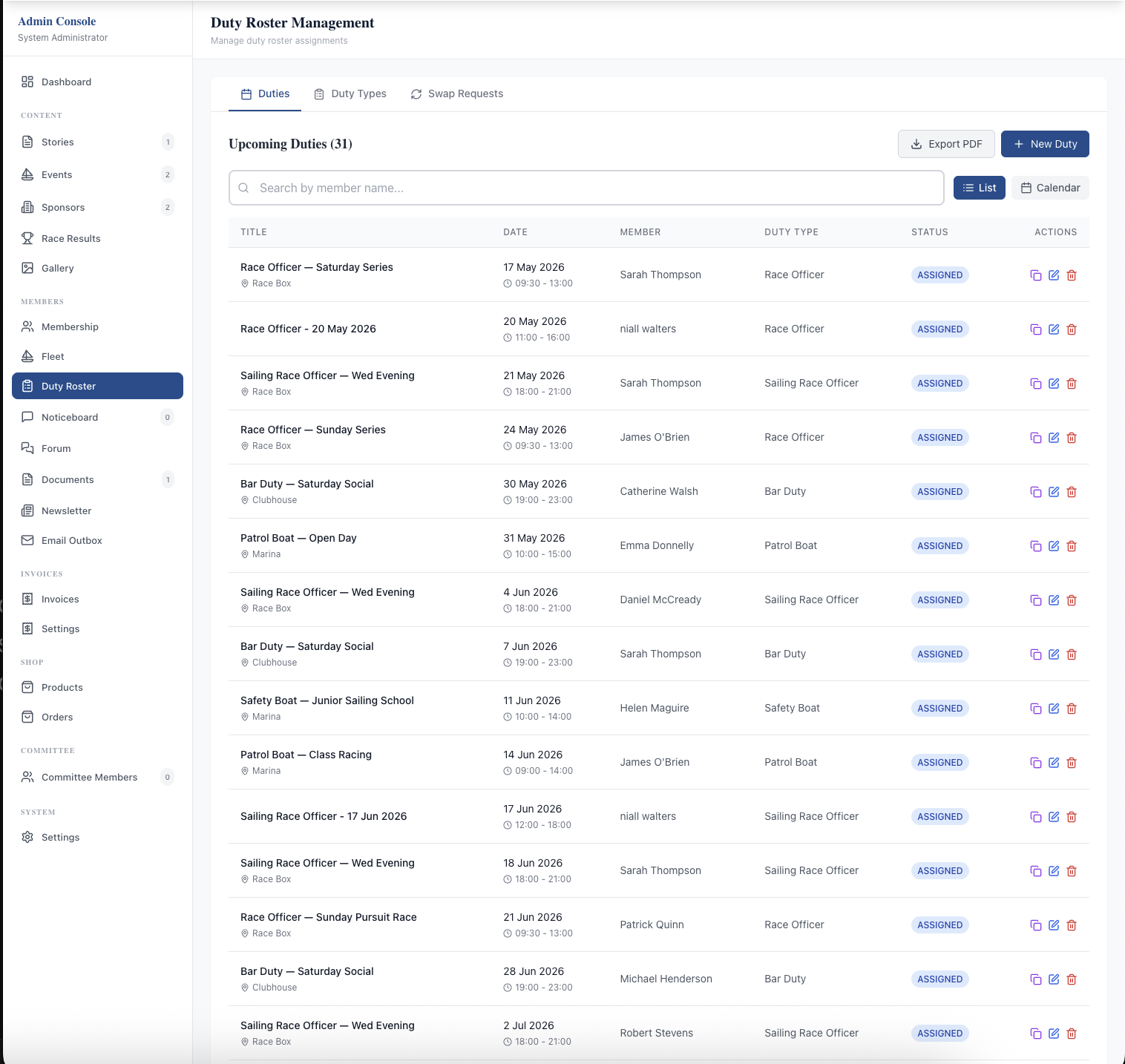
The Duty Roster Management admin page in List view: three tabs across the top (Duties, Duty Types, Swap Requests), "Upcoming Duties (15)" header, search-by-member-name field, Export PDF + New Duty buttons, List/Calendar toggle, and rows listing each duty with title, date, member name, duty type, an "assigned" status badge, and Edit/Delete action buttons.
Admin: Duties tab in List view. Every upcoming duty with searchable filtering, duty-type column, status badges, Edit/Delete actions, Export PDF, and a +New Duty button.
The Duty Roster Management admin page in Calendar view: same Duties tab but rendered as a May 2026 month grid. Each date that has duties shows a coloured pill with the duty type and count, e.g. "Race Officer (1)", "Sailing Race O…", "Bar Duty (1)", "Patrol Boat (1)". Month navigation arrows are at the top right.
Admin: Duties tab in Calendar view. A month grid showing duty counts as coloured pills — quick visual check that the season has cover on every date.
The Edit Duty modal: Duty Type Race Officer, Date 20/05/2026, auto-generated title preview "Race Officer - 20 May 2026", Start Time 11:00 and End Time 16:00 dropdowns, Assignment Type toggle (Registered Member selected vs External Person), Assign to Member field with search-by-name-or-email and 8 visible members in a two-column radio-button list (12 members available total).
Admin: Edit Duty modal mirrors the Create flow. Change the duty type, date, time, or reassign to another member — or switch to an External Person for a non-member assignment.
A member's Duty Roster page: header "Duty Roster — View the duty calendar, manage your duties, and request swaps", a "7 upcoming duties" counter, the "My Upcoming Duties (7)" panel listing seven duties with title, duty type, date, time, and a "1 Request" badge on each that has a pending incoming swap. The Request/Incoming/Requests/History tabs are on the right with a "3" badge on Incoming. A "Request a Swap" panel prompts the member to click an upcoming duty to start a swap.
Member: My Upcoming Duties on the left (each duty showing a count badge for any pending swap), four-tab workflow on the right with the Incoming tab badged with unresolved request count.
The Incoming tab on a member's Duty Roster page showing "Incoming Requests (3)" — three pending swap requests from Michael Henderson, James O'Brien, and Aoife Murphy. Each card shows the requester's name with a "First" or order badge, "Requested X days ago", a Pending status pill, the personal note in italic quote marks, both duties laid out as cards side by side (the requester's duty and Sarah's duty), and red Reject / green Accept buttons.
Member Incoming tab: each pending swap request shows the requester, when they sent it, their personal note, both duties side by side, and one-click Reject / Accept.

Related features

See Duty Roster in action — book a 20-minute walkthrough.