Feature

Crew Finder

Boat owners post crew requests for a day, a date range or every week. Members browse and apply.

What it does

A members-only matching tool that connects boat owners short of crew with members looking to get on the water. Two sides share one screen — switch role with a click. Crew side: Find a Boat shows every open request with boat, sail number, title, dates, crew needed, poster, and an Apply button; Set Availability flags free dates; My Activity tracks applications sent. Boat-owner side: My Requests lists every active request with live counts ("0 accepted · 2 pending"), View Crew / Mark Filled / Cancel actions, and a yellow alert banner summarising pending applications across all requests; Available Crew browses members who've marked themselves free.

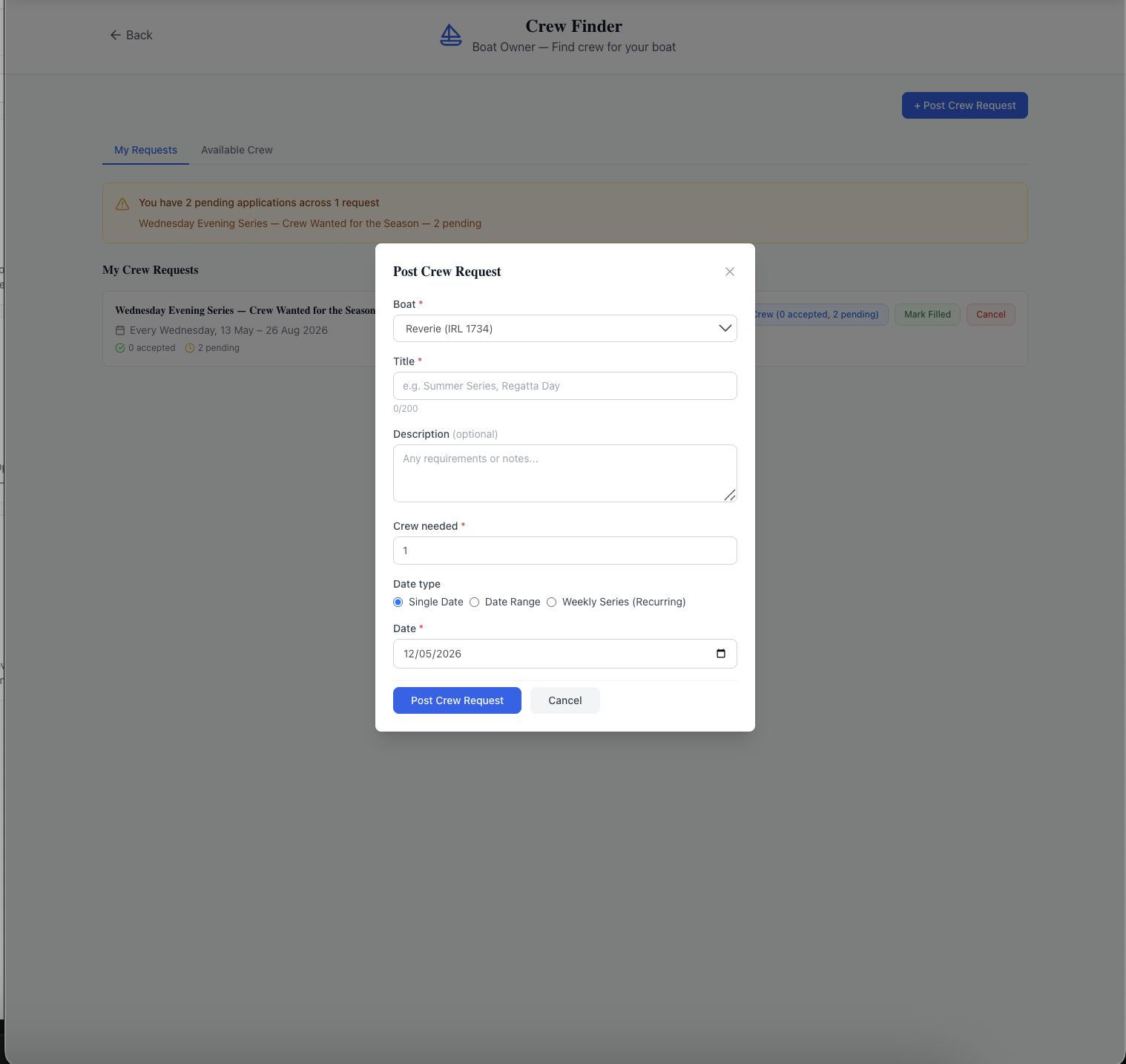
Posting a request is one form: pick the Boat from a dropdown of boats you own, set a Title, optional Description, the number of Crew needed, then choose a Date type — Single Date (a regatta day, a passage), Date Range (a championship weekend, a cruise), or Weekly Series Recurring (every Wednesday for the season). Applications land in your queue with the applicant's personal note. Accept or Reject inside the platform; accepted crew get a notification and your contact details for the practical follow-up.

What sells it

  • Three date types — Single Date, Date Range, Weekly Series Recurring — so one season-long Wednesday request covers the whole series, not a new post every week
  • Two-role UX on one screen — crew tabs (Find a Boat / Set Availability / My Activity) and owner tabs (My Requests / Available Crew) without separate accounts
  • Per-request live counts — "0 accepted · 2 pending" plus a pending-applications alert banner so owners never miss an application
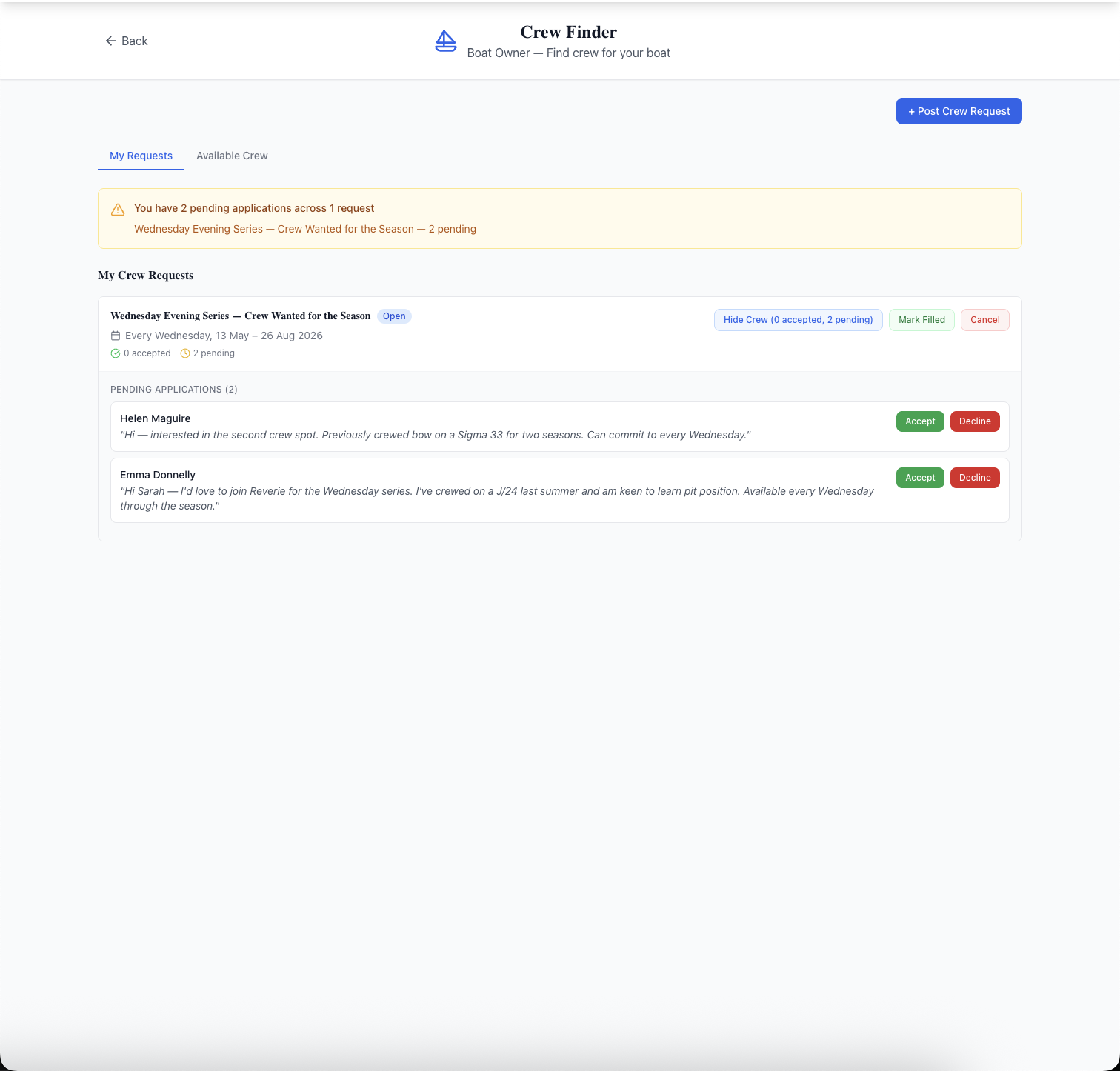
  • One-click Accept / Reject on each applicant with their personal note visible — no out-of-band negotiation
  • Set Availability tab for crew — flag free dates ahead of time so owners can find you proactively
  • Members-only by design — applicant contact details only shared with the boat owner on application, never broadcast
  • Mark Filled and Cancel on every request — close the listing cleanly when crew is sorted or the event itself is off
  • Search and Filter by Date on the Find a Boat tab — locate requests for a specific weekend without scrolling

Why this matters

"Where's my crew?" is one of the most common friction points in club racing. Informal WhatsApp and Facebook channels work until they don't, and leave no record of who offered and who accepted. A structured crew finder inside the club's own platform means matching happens within the membership, recurring requests cover the weekly grind, single-date requests cover the standout regattas, and the activity is logged so the club can see who is getting on the water.

Frequently asked questions

Yes. The Post Crew Request form has a Date type with three options: Single Date (a regatta day, a passage), Date Range (a championship weekend, a long cruise), or Weekly Series Recurring — every Wednesday or every Saturday for the period you specify.

See related features: Member Forum · Duty Roster · back to Sailing Club Software.
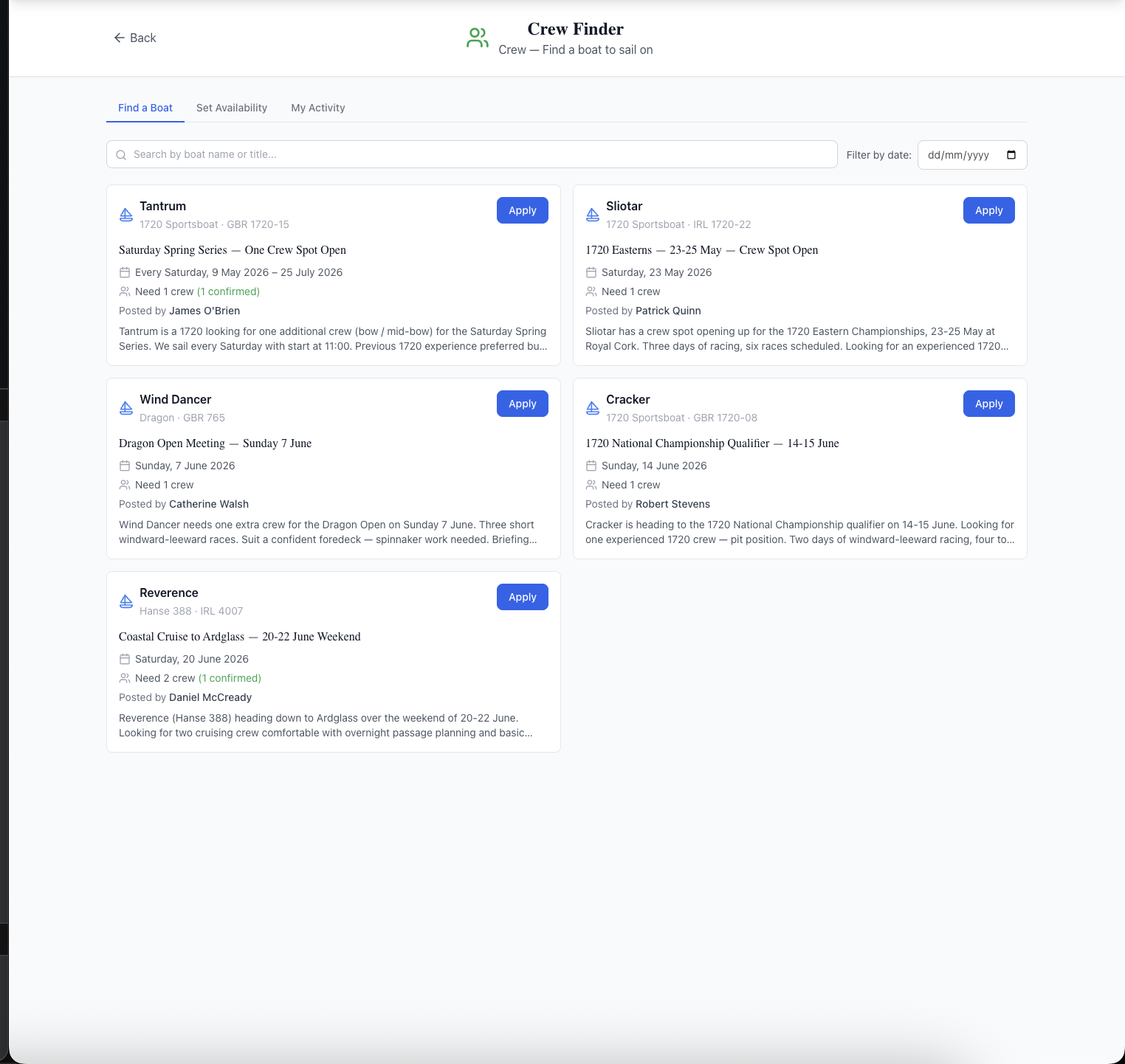
The Crew Finder page in crew mode: header "Crew Finder — Crew → Find a boat to sail on", a Back button, three tabs (Find a Boat selected, Set Availability, My Activity), a search input and a Filter by Date dropdown, and a grid of six open crew request cards. Each card shows the boat name and sail number, the request title (e.g. "Saturday Spring Series — One Crew Spot Open", "1720 Easterns — 23-25 May", "Dragon Open Meeting — Sunday 7 June", "1720 National Championship Qualifier — 14-15 June", "Coastal Cruise to Ardglass — 20-22 June Weekend"), date pattern, crew needed, who posted, and an Apply button.
Crew side — Find a Boat shows every open request with boat, sail number, dates, crew needed, poster, and an Apply button. Switch to Set Availability to flag free dates, or My Activity to track applications.
The Crew Finder page in boat-owner mode showing the Post Crew Request modal: header "Crew Finder — Boat Owner — Find crew for your boat", My Requests tab active with one request (Wednesday Evening Series) showing "0 accepted · 2 pending" plus View Crew / Mark Filled / Cancel action buttons, and a yellow alert "You have 2 pending applications across 1 request". The Post Crew Request modal is open in the centre with fields: Boat dropdown (Reverie IRL 1734), Title, optional Description, Crew needed, a Date type radio group (Single Date, Date Range, Weekly Series (Recurring)), and a Date picker.
Boat-owner side — pending-applications alert at the top, live "accepted · pending" counts per request, and the Post Crew Request modal showing the three Date type options: Single Date, Date Range, or Weekly Series (Recurring).
The boat-owner application review view: My Requests tab with the Wednesday Evening Series request expanded. The yellow pending-applications alert is still visible at the top. Below the request header, a "Pending Applications (2)" section shows each applicant — Helen Maguire and Emma Donnelly — with their italicised personal note ("Hi — interested in the second crew spot. Previously crewed bow on a Sigma 33 for two seasons. Can commit to every Wednesday." and "Hi Sarah — I'd love to join Reverie for the Wednesday series. I've crewed on a J/24 last summer and am keen to learn pit position. Available every Wednesday through the season.") and a green Accept and red Decline button per row.
Boat-owner application review — every applicant on one screen with their personal note, plus one-click Accept / Decline. The Hide Crew toggle collapses the panel; Mark Filled closes the request once you have enough crew.

Related features

See Crew Finder in action — book a 20-minute walkthrough.