Get Yacht Clubs Manager running at your club. Book a 20-minute walkthrough.
Your annual subscription is due, or the club has sent you an invoice for winter storage or a joining fee. If your club uses online invoicing, paying your club subscription online takes a couple of minutes: find the invoice, check it, and pay by card, or tell the club you have paid by bank transfer. This guide shows where everything is and what happens after you pay.
How you hear about an invoice
When the club sends you an invoice, you receive an email with the invoice number and your club's name in the subject line. The invoice itself is attached as a PDF, and a View My Invoices button takes you straight to the members area.
You do not have to wait for the email, though. Every invoice the club has sent you is also waiting in your account.
Finding your invoices
- Sign in to the members area.
- On the dashboard, open the My Invoices and Renewals card. A badge on the card shows how many invoices are unpaid; it turns red if any are overdue.
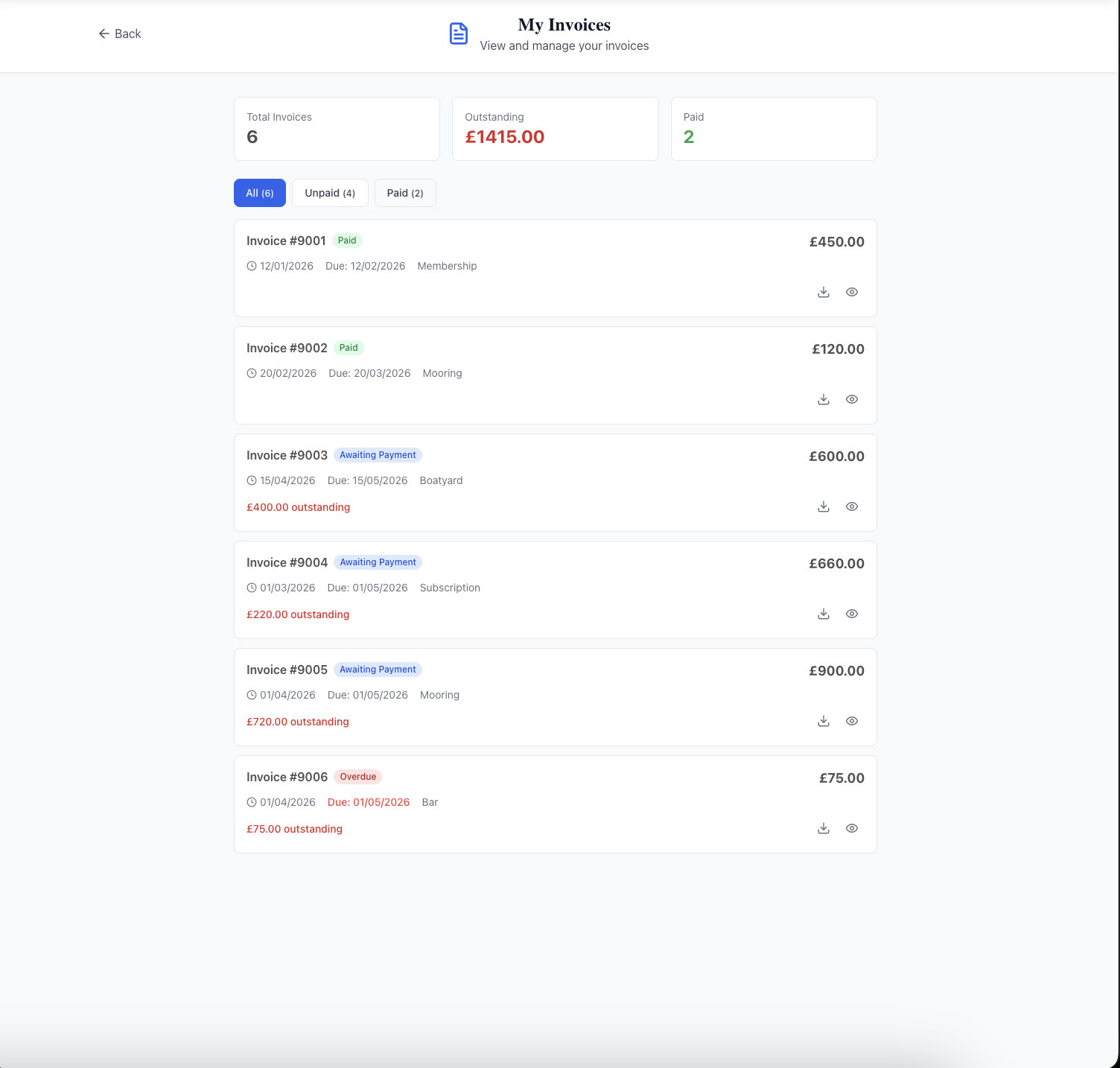
- The My Invoices page shows three totals at the top (total invoices, the amount outstanding and how many are paid), then a list you can filter by All, Unpaid, Paid or Refunded.
Each invoice in the list shows its number, status, issue date, due date, category (for example subscription or boatyard) and how much is still outstanding. The statuses you will see are Awaiting Payment, Paid, Overdue, Refunded and Partially Refunded.
Viewing and downloading an invoice
Click the eye icon to open an invoice. You will see the issue and due dates, each line with its quantity, price and any VAT, and then the total, what has been paid and what is outstanding. Any notes from the treasurer appear underneath.
Use Download PDF (or the download icon in the list) to save a copy. The PDF is a proper invoice for your records and, where the club accepts them, includes its bank details for a transfer and instructions for paying by cheque.
Paying your club subscription online by card
On the invoice, the Make a Payment panel shows the ways your club accepts payment for that invoice. To pay by card:
- Under Pay by Card, check the amount due and press Pay Now.
- You are taken to a secure Stripe payment page. Enter your card details and pay. The club never sees your full card number.
- You come back to a Payment Confirmed page. Occasionally it says the payment is still being processed; the invoice updates itself a moment later.
- You receive a "Payment Received" email showing the amount and date. Once the invoice is paid in full, a receipt PDF is attached.
If you change your mind on the payment page, just go back: nothing is charged and the invoice stays unpaid. The money goes straight to your club's own account. If the club has not set up card payments, the invoice will say so and suggest paying by bank transfer instead.
Paying by bank transfer: "I've paid"
Many members prefer to pay by bank transfer. The invoice shows a Pay by Bank Transfer section with the references to quote, your account reference and the invoice number, and the PDF has the club's full bank details.
- Make the transfer from your bank, quoting both references.
- Back on the invoice, press I've paid — notify admin.
- Add a note if you like, such as the date you paid or your bank's transaction reference, and press Send notification.
The club's administrators are notified straight away. The invoice will still show as unpaid until the treasurer has checked the money has arrived and recorded it. When they do, you receive the same "Payment Received" email as a card payment. That gap is normal; bank transfers take time to reconcile and are checked by a person.
Reminders and overdue invoices
Your club can have reminders sent automatically. If it does, you receive a "Payment Reminder" email a few days before an unpaid invoice is due (the club chooses how many), and a single email the day after it becomes overdue. The treasurer can also send you a reminder by hand. Paying the invoice stops any further reminders.
If the invoice is for your membership renewal, and your club has chosen to deactivate memberships that are not paid, you are also warned by email a week before that happens. If a membership does become inactive, signing in takes you straight to your invoices so you can pay and get back in.
Keeping track of what you have paid
Paid invoices stay in your account, so you do not need to keep every email. Use the Paid filter on My Invoices to see them, and download the PDF of any invoice whenever you need it, for example if you claim club costs back or simply like to keep your own records.
If a payment has been recorded against an invoice but something is still owed, the invoice shows the amount paid and the amount still outstanding, and the list shows the outstanding figure in red. Invoices for other things you have paid for through the site, such as event entries, appear here too as paid invoices.
Common questions
We have a family membership. Who pays? The member whose account it is. A family membership is one household account: your partner and children are recorded on your profile rather than having their own logins, and the invoice comes to you. Invoices are only visible to the member they are addressed to.
Can I pay in instalments? Invoices are paid in a single payment. If that is difficult, talk to your treasurer before the due date.
Can I pay by Direct Debit? No. Online payments are by card. Bank transfer and, where the club accepts it, cheque are the alternatives.
I have been charged twice, or I need a refund. Contact the club. Refunds are made by the treasurer, and a refunded invoice then shows as Refunded or Partially Refunded in your list.
The invoice email went to spam. It does not matter: every invoice is in My Invoices whether or not the email arrived.
Related guides
New to the site? Read joining your club online. Paying for a crane lift or club boat is covered in booking the club crane or boat, and event entries in entering a club event online. If you are the treasurer, see online invoicing for treasurers and the invoicing and payments feature page.
Like the read? See it running with your club's data — book a demo.