Get Yacht Clubs Manager running at your club. Book a 20-minute walkthrough.
An established club carries decades of habits. The membership list lives in a spreadsheet one person understands, subscriptions arrive by cheque and standing order, and the duty rota is pinned up in the bar. None of that is broken, exactly, and some members like it the way it is. So modernising an established yacht club is less about software than about change: getting the committee to agree, moving in sensible stages, and making sure nobody feels left behind. This is a practical plan for doing that.
Start with the committee, not the members
Members will take their lead from the committee. If the commodore, secretary and treasurer are lukewarm, every question at the bar becomes a reason to stop. Before you choose anything, get the committee to agree three things:
- The problems you are solving. Write them down in plain terms: "renewals swallow the membership secretary's evenings every spring", "we don't know who has paid for their mooring", "nobody reads the website". Specific problems keep the discussion away from feature wish-lists.
- Who owns each area. Membership, money, events, duties and the website each need one named person. That person will learn the new system first and answer questions about it.
- What is not changing yet. Saying out loud that, for example, the duty rota stays on paper this season takes a lot of heat out of the conversation.
It helps to let the sceptics see the system rather than hear about it. A walkthrough of what a member actually sees (their invoices, their duties, the club's news) usually answers more objections than a written proposal. If you are still comparing options, our guide to choosing club software lists the questions worth asking any supplier.
Phase the modernisation
Trying to switch everything on the same weekend is the most common mistake. A phased plan gives each officer time to learn their part and gives members one new thing at a time. With Yacht Clubs Manager, the team sets up your site first (branding, colours, logo, domain and email sending) and your committee then configures the rest in the admin console. A sensible order from there:
Phase one: the public website and news
Start with something visible and low-risk. Publish news with photos, put the season's events on the calendar with their documents, add committee members and sponsors, and link your results. Members get used to the new site as the place where club information lives, and nobody has had to change how they pay.
Phase two: membership and invoices
Next, bring members in and move billing across. Set up your membership types, connect the club's Stripe account, and agree your invoice settings. Many clubs time this so that the first invoices raised in the new system are the annual renewals, which gives everyone one clear moment of change. Automatic renewal features exist but are all off until you choose to turn them on, so you can run the first year by hand.
Phase three: events, duties and the extras
Once members are logging in, switch on online event entry, publish the duty roster, and add whatever else suits your club: the member noticeboard, the forum, crew finder, bookable resources such as the crane, or the club shop. Each is an option you turn on when the person responsible is ready, not before.
Bringing existing members across
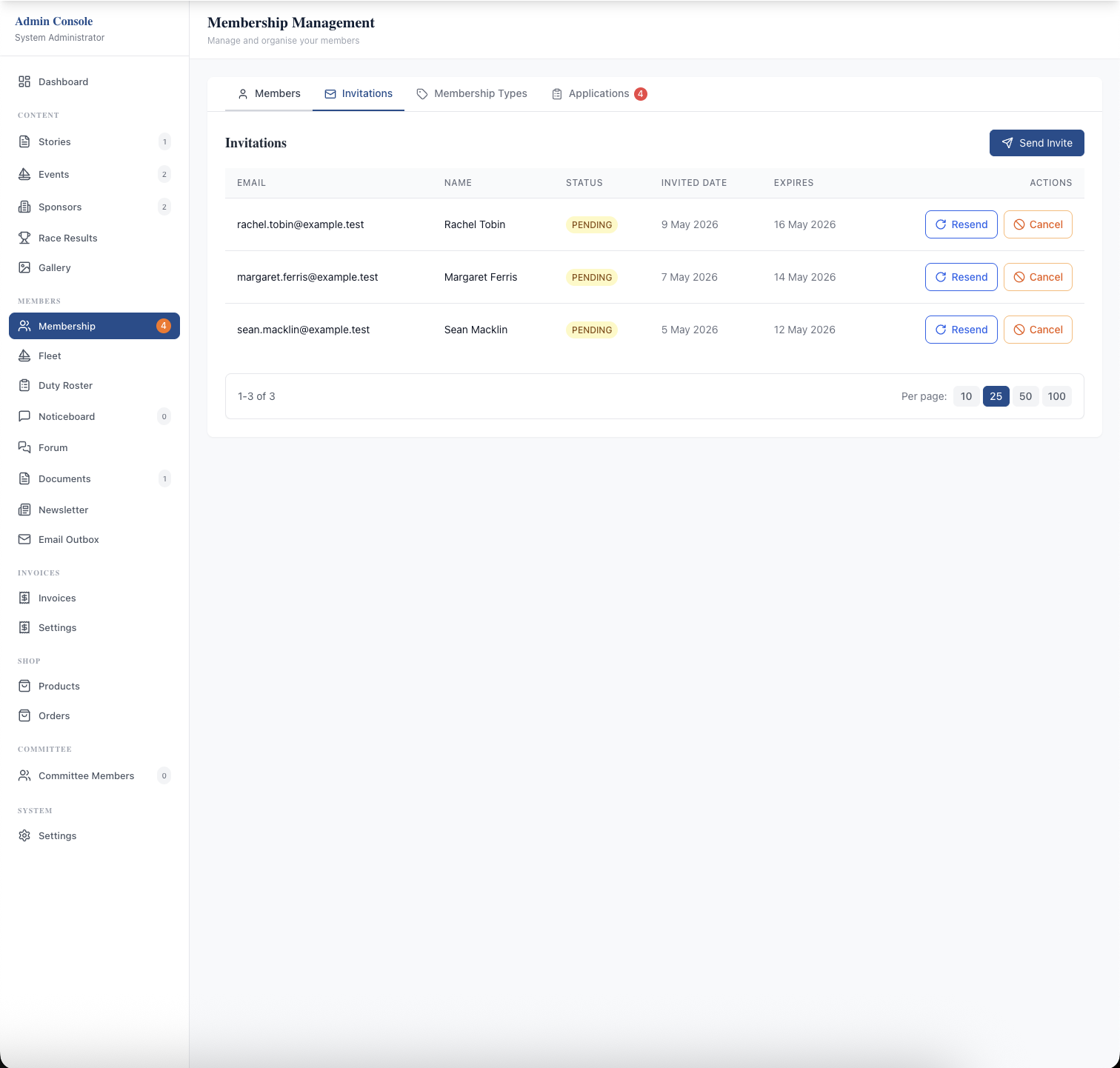
This is the step people worry about most, and it is simpler than it sounds. You don't need to clean up the whole membership spreadsheet first. To invite existing members in bulk you upload a spreadsheet with exactly three columns: First Name, Last Name and Email. You review the list before anything is sent. Each member then gets an invitation email and completes their own details: contact information, family members, emergency contacts, qualifications and boats, with the steps shown set by their membership type.
That shifts the data-entry job from the membership secretary to the people who actually know the answers, and it means the records are current from day one. Invitations can be resent or cancelled from the admin console, so it's easy to see who hasn't responded and give them a nudge. There is more on preparing this in moving club members off spreadsheets.
Some members would rather not fill in a form at all. For them, an admin with full access can add the member directly (an email address is still needed); the system emails them a temporary password and they choose their own the first time they log in. For the handful who will never log in, that's fine too: they can still be invoiced and pay the way they always have.
Keep the old ways of paying
Modernising doesn't have to mean card-only. Each invoice can allow card, bank transfer, cheque or any mix of them, and the invoice PDF carries your bank and cheque details. A member who pays by transfer can press "I've paid" on their invoice so the treasurer is notified, and the treasurer records transfers, cheques and cash against the invoice when they arrive. Members who prefer cards get the convenience; members who don't are not forced to change. The treasurer's guide to online invoicing covers this in detail.
Share the work with delegated permissions
One reason established clubs struggle is that everything runs through one or two people. Rather than giving every officer full admin access, you can give each member specific permissions: news, events, duty roster, viewing the member list, invoices, the shop, settings, or full access. The permissions are enforced by the system, not just hidden in the menus, so the social secretary can publish events without seeing anyone's payment history.
The admin dashboard shows a to-do list of what needs attention, such as new applications, overdue invoices, booking approvals and noticeboard posts waiting for moderation. An admin actions log, which you can filter and export, records recent changes and who made them. When officers change at the AGM, you change permissions rather than passwords. See committee roles and permissions.
Take data protection seriously from day one
Moving members' personal details into a new system is a good moment to tidy up how the club handles them. A few things are built in:
- members can download a copy of their data, and can delete their own account once nothing is outstanding (no unpaid invoices, upcoming duties or open bookings);
- before an admin deletes a member, every open item (invoices, bookings, shop orders) is listed so you decide what happens to each, and personal data is then anonymised;
- automatic clean-up removes stored IP addresses after 120 days and email bodies after 24 months, erases decided applications after 12 months, and anonymises members who lapsed more than two years ago;
- members control whether they receive duty emails and club newsletters.
None of that replaces the committee's own responsibilities, but it makes them easier to meet. Our plain-English GDPR guide for committees goes further.
Talk to members early and often
Finally, tell members what is happening before it happens. A short news story on the new website, a note in the newsletter, and a word at the bar go a long way. Explain what changes for them this season, what doesn't, and who to ask. Offer to help anyone who gets stuck with their invitation. The members who complain loudest in the first month are often the ones who become the system's champions by the end of the season, once they find they can pay their subscription and swap a duty from their phone.
To see how the pieces fit together for an established club, read our overview of yacht club software or look at member management in detail.
Like the read? See it running with your club's data — book a demo.